Need help? Reach us at 

 +1 (855) 418-2323
Need help? Reach us at
+1 (855) 418-2323

 File Converters TIFF and PDF apps Forensic Freeware
PDF Converter Software Download - Batch PDF Converter with Advanced Features
Windows
2000/2003/Vista
7/8/10/11/Citrix
Total PDF Converter software changes PDF files to DOC, RTF, TIFF, XLS, HTML, EPS, PS, TXT, CSV, PDF/A and images in batch. Our advanced PDF converter software provides professional-grade PDF conversion with the most comprehensive feature set available. Unlike other PDF converter software, the Total PDF Converter is extremely user-friendly thanks to a well-planned interface. Download our batch PDF converter software and experience the most efficient PDF conversion available. Additionally, registered users gain direct access to command line support for quiet automatic functioning on the back end.
Looking for reliable PDF converter software? Our Total PDF Converter software handles all your PDF conversion needs. Whether you need batch PDF conversion or single file processing, our PDF converter software delivers professional results every time."
Need a single quick conversion? Try the free online tools — no install, no signup: PDF to DOC, PDF to TIFF, PDF to TXT, PDF to XML, EPS to PDF, PS to PDF, PDF to RTF.
With support for over 25 different formats Total PDF Converter is neither complex nor difficult to use. If you need a server version without any GUI or interrupting messages check out the Total PDF Converter X with ActiveX. Buy your license today and convert PDF files with the full registered version in 5 minutes.
(includes 30 day FREE trial)
(only $39.90)

"We had some 2,200 PDF files that needed to be converted to TIFF. The project manager said we would have to rescan the files, go into the back closets, dust off the cabinets, find and pull the files and rescan them, and of course then re-file the reports. With the Total PDF Converter we put a copy of the files into a sub-directory, I went in and selected the subdirectory and 2 hours later the files were converted. Thanks for a great product at a reasonable price."
 Carolyn Gorup
Senior manager
Carolyn Gorup
Senior manager
"I find your Windows product to be excellently conceived and executed. The GUI is very straightforward; controls thoughtfully placed. One does not need a manual to become quickly productive. Performance and quality of results meets or exceeds expectations. Your business pricing is right in the middle of the market, a good place to be. Coomand line is where I will do most of my work. As an old DOS user, I felt "right at home". Once I figured out the parameters, performance was superb."
 Bruce A. Chitiea
SafeSectors, Inc.
Bruce A. Chitiea
SafeSectors, Inc.
Anyone who converts PDF files to DOC, Excel, TIFF, HTML, and 20+ other formats in batch
Extract editable text and tables from PDF documents
Office staff convert incoming PDF reports, contracts, and forms into editable DOC and XLS files for revisions, data extraction, and reuse. Batch-convert entire folders of PDF files at once and combine multiple PDFs into a single Word document — all offline with no internet connection required.
Convert PDF files to PDF/A for long-term storage
Records managers and compliance teams convert standard PDF files to PDF/A format for regulatory-compliant long-term archival. Process thousands of files in batch, add page numbers to every document, and ensure your archives meet ISO standards for document preservation without relying on cloud services.
Convert PDF content for web publishing and presentations
Content teams convert PDF brochures, catalogs, and reports to HTML for web publishing or to JPEG and PNG images for presentations and social media. Control output quality and image size, and convert multi-page PDFs into individual page images or a single multi-page TIFF for print production.
Extract structured data from PDF to CSV and TXT
Analysts and data teams extract tabular data from PDF reports by converting them to CSV or TXT for import into databases, spreadsheets, and analytics tools. Total PDF Converter handles password-protected PDFs when you supply the password, and processes entire folder trees in one operation.
Run batch PDF conversions via command line
IT departments automate PDF conversion workflows using the built-in command line interface. Incoming PDFs are converted to DOC, TIFF, or EPS on schedule without user interaction. For server-side integration with ActiveX and no GUI, the companion Total PDF ConverterX handles web server and enterprise deployments.
Turn scanned TIFF images into text-searchable PDFs
Records and back-office teams convert scanned TIFF documents into searchable PDFs with the built-in OCR engine — in a single pass, with no separate OCR tool. The recognized text becomes selectable and searchable, and batch processing preserves your original folder structure, so a tree of TIFF scans turns into a matching tree of searchable PDFs.
Updated Mon, 08 Jun 2026
(only $39.90)
Launch Total PDF Converter on your Windows PC.

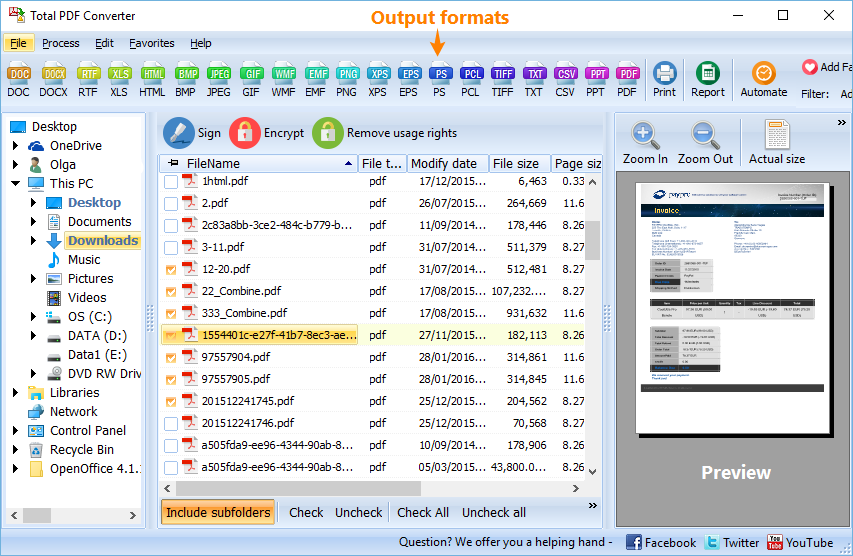
In the left navigation tree, click the folder that contains your PDF files (Desktop, Documents, etc.).

In the middle panel, tick one PDF or select multiple PDFs you want to convert.

To select all files in the current folder, click Check All.

Choose the output format on the top toolbar (PDF/A, DOC, TIFF, JPG, TXT, etc.).

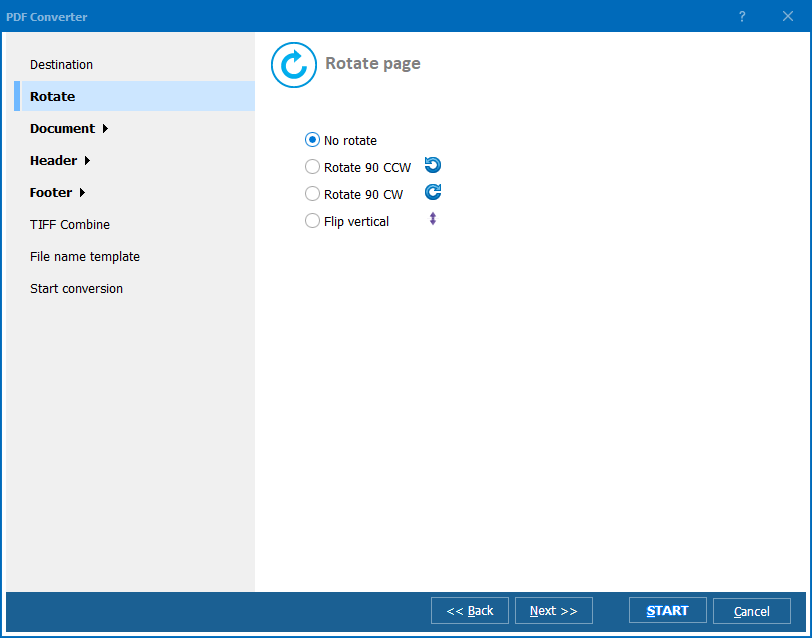
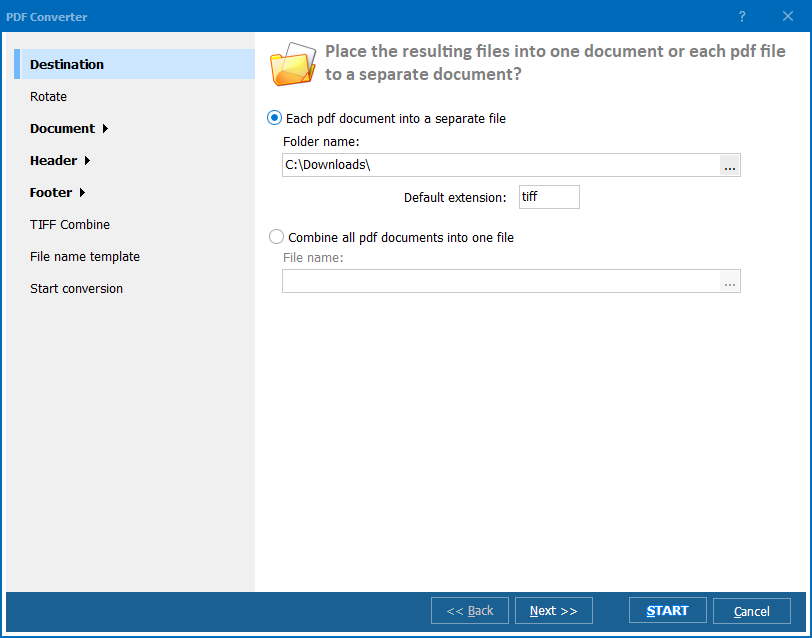
After selecting the target format, a settings dialog opens. Configure the options you need:
In the same settings window, adjust:
Start conversion and wait until it completes. Then check the output:
Updated Mon, 08 Jun 2026
(only $39.90)
Updated Mon, 08 Jun 2026
(only $39.90)
Download free trial and convert your files in minutes.
No credit card or email required.