Need help? Reach us at 

 +1 (855) 418-2323
Need help? Reach us at
+1 (855) 418-2323

 File Converters TIFF and PDF apps Forensic Freeware
Mail Viewer: Open EML, MSG & EMLX Files Free
Windows
2000/2003/Vista
7/8/10/11/Citrix
Coolutils' Mail Viewer is a free program that lets you view MSG, EML, EMLX, P7M, ICS, VCF and winmail.dat (TNEF) files. Although Microsoft's MSG format is great for storing emails, there just aren't many ways to access and view those files outside of the Outlook server Exchange client. Added to that, Microsoft's EML format (associated with Outlook Express) also gives users problems when trying to open and view.
The good news is - we can help! If you're stuck trying to open MSG or EML files but don't have access to your Outlook client, CoolUtils' Mail Viewer is the perfect solution. Not only does it let you open and view MSG and EML files from anywhere; it's free, and by free we mean totally free for home users. No hidden downloads, no ads, no toolbars, no having to pay later: 100% free! Commercial use.
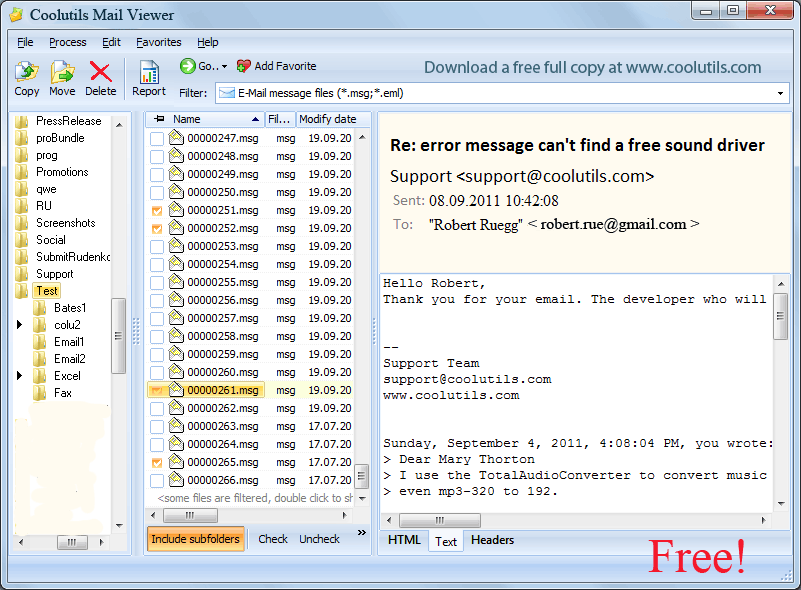
Getting started is easy. Launch the email viewer, find the MSG or EML file you want to work with and click on it. The email will be displayed immediately. Beyond viewing MSG and EML our Mail Viewer lets you copy, move and delete selected emails. Soon you'll be saving time while you archive, organize and manage your emails.
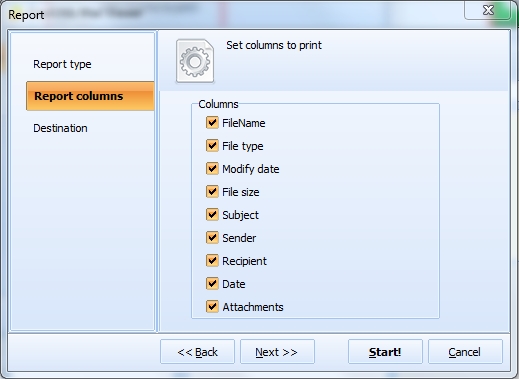
CoolUtils Mail Viewer is also capable of generating a "fact file" related to your emails. Made available to you in your choice of TXT, PDF, XLS, CSV, or HTML these reports are able to provide you with valuable data re: your email activity. All you need to do is choose which fields you'd like to report on; Sender, Recipient, Date, Attachment, etc. Tune the report to your needs by including only specific fields, or examine them all!
Quick answer: CoolUtils Mail Viewer opens MSG, EML, EMLX, P7M, ICS, VCF and winmail.dat files without Outlook — just launch it and click a file to display the email instantly. You can also copy, move and delete emails, and generate reports in TXT, PDF, XLS, CSV or HTML. Free for home users; a license is required for commercial use.
P.S. Want to save MSG/EML as PDF, DOC, TXT, HTML, TIFF files? Try our Total Mail Converter.

"Great, great, great ! Prog. can even open and/or save attachments ! :-)"
 Edgar
Edgar
"I tried a different .eml viewer and was disappointed that I had the UAC pop up every time I needed to open an .eml file. I tried downloading CoolUtils Mail Viewer from CNET and had trouble, so I came to CoolUtils site and downloaded. The program installed quickly without any hidden features or adware. Part of the app asked if I wanted the program associated with all .eml files, which I did. It opened the .eml file I wanted without a hitch."
Christian Fiste
The most versatile free email file viewer for Windows
No hidden costs, trial periods, or "commercial license required" surprises. Full-featured viewer at zero cost for home users.
Handle MSG, EML, EMLX, P7M, ICS, VCF, and winmail.dat files in one application. No need to juggle multiple tools.
View Microsoft email files without installing Outlook or Exchange. Completely standalone — works on any Windows PC.
Preview, save, and extract all types of email attachments including documents, images, and multimedia files.
Generate comprehensive reports in PDF, TXT, XLS, CSV, and HTML formats with customizable columns and email statistics.
Copy, move, delete, and organize email files with built-in operations. Manage your email archives efficiently.
No ads, no toolbars, no bundled software — just pure functionality. A focused tool that respects your system.
The only free viewer supporting winmail.dat (TNEF), calendar files (ICS), and contact files (VCF) all in one place.
Find emails quickly by sender, subject, recipient, or date without indexing. Results appear as you type.
Native Windows integration with a familiar file explorer interface. Feels right at home on any Windows version.
Powerful tools to view, search, and manage your email files
Open MSG, EML, EMLX, P7M, ICS, VCF, and winmail.dat files from any email client including Outlook, Thunderbird, Apple Mail, Entourage, and Windows Live Mail without requiring the original applications.
Preview, save, and extract email attachments of all types including documents, images, videos, and archives. View attachment properties and organize files efficiently within the interface.
Quickly locate specific emails using powerful search functionality. Filter by sender, subject, recipient, date ranges, or content keywords to find exactly what you need in large email collections.
Create detailed analytical reports about email files in PDF, TXT, XLS, CSV, or HTML formats. Include custom columns, statistics, and metadata for compliance, archival, or analysis purposes.
Copy, move, and delete email files directly within the application. Organize your email archives efficiently with familiar file management operations integrated into the email viewing experience.
Navigate through email files using an intuitive tree structure interface similar to Windows Explorer. Easily browse folders and subfolders containing email files with visual organization.
View email content, headers, properties, and attachments simultaneously in organized panes. Switch between different viewing modes to optimize your workflow and information access.
Unique support for winmail.dat (TNEF), calendar files (ICS), contact files (VCF), and encrypted emails (P7M). Handle specialized email formats that most viewers cannot open.
Trusted by professionals who need reliable email file access
Email evidence review and e-discovery
Review email evidence from various sources, examine attachments for case preparation, generate court-ready reports with metadata preservation, and analyze communication patterns for legal proceedings without modifying original files.
Email troubleshooting and recovery
Recover emails from corrupted mailboxes, troubleshoot email client issues, migrate email data between systems, and provide user support for email file access without requiring full email client installations.
Email evidence analysis and investigation
Examine email evidence from suspect systems, analyze metadata and headers for investigation purposes, generate forensic reports for legal presentation, and maintain chain of custody with read-only email access.
Email archival and regulatory compliance
Review historical email communications for compliance audits, generate regulatory reports with complete metadata, analyze business communications for policy violations, and maintain organized email archives for retention requirements.
Email data rescue and conversion
Recover emails from damaged storage devices, access orphaned email files after system crashes, assist clients with email format conversions, and provide email data recovery services without expensive specialized software.
Updated Fri, 09 Oct 2026
(only $59.90)
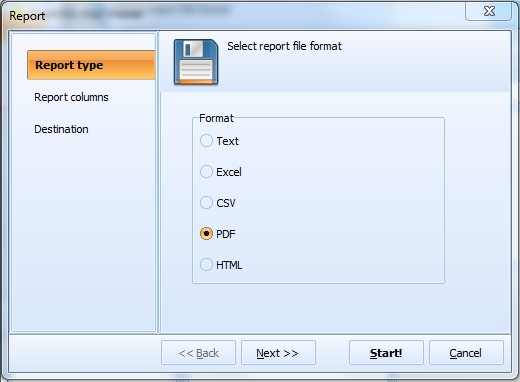
The Free Email Viewer also allows you to create reports. Just check the message files and press the Report button. Select the appropriate format (text, Excel, PDF, HTML, etc.), and press the Start button. Get a detailed report in just a few seconds.
The program interface is convenient and user-friendly. You will simply navigate it and view your EML or MSG files with ease.
Updated Fri, 09 Oct 2026
(only $59.90)
Updated Fri, 09 Oct 2026
(only $59.90)
Download free trial and convert your files in minutes.
No credit card or email required.