Need help? Reach us at 

 +1 (855) 418-2323
Need help? Reach us at
+1 (855) 418-2323

 File Converters TIFF and PDF apps Forensic Freeware
The free XML viewer for Windows that displays XML files in a clear tree structure and converts XML to JSON without any configuration.
Windows
2000/2003/Vista
7/8/10/11/Citrix
CoolUtils XML Viewer opens XML, JSON, and FO files instantly and renders them in a readable tree structure. The tool highlights syntax, validates document structure, and converts XML to JSON with a single click. Download the free XML viewer and parse files offline — no registration, no ads, no Adobe dependency.
Quick answer: CoolUtils XML Viewer opens XML, JSON and FO files instantly and renders them in a readable, expandable tree — no Adobe dependency. It highlights syntax, validates structure, converts XML to JSON in one click, and lets you search elements, sort files, and print or produce full reports. It runs offline and is 100% free.
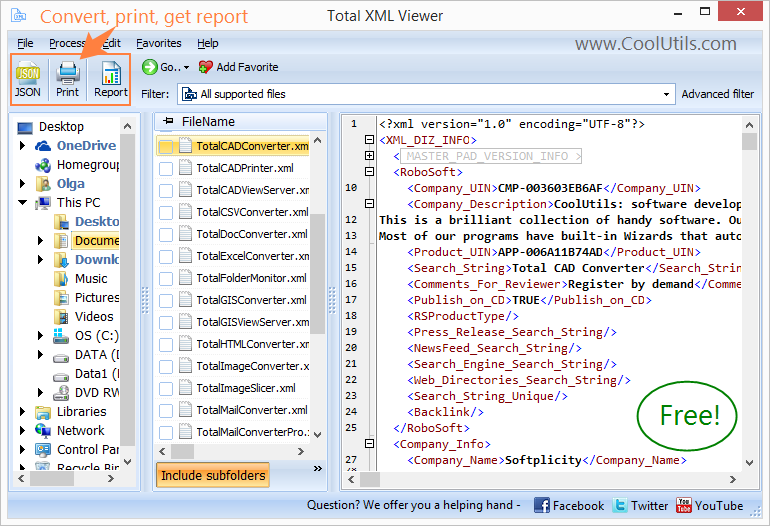
Select any folder and click any XML file to view it instantly. Sort your files by name, size, or date. Expand or collapse nodes for better navigation through complex document hierarchies. The built-in search field locates specific elements or attribute values without manual scrolling.
If you need to convert XML files to CSV, PDF, or other formats, see the Total XML Converter.
CoolUtils XML Viewer is used by developers inspecting API responses and configuration files, data analysts reviewing structured data exports, and technical writers working with FO documents. It runs on Windows with no installation prerequisites beyond the application itself.

"As very basic tool to view and print XML files. It does not do more than that but it works smoothly even with my large XML files. Keep the good work, thank you."
 Clarice Brewer
"Coolutils XML Viewer saved me a lot of time. I tried several other apps, but they were either paid or installed some crap on my pc. This viewer was perfect for me, free and clean."
 George Mauriski
A free, fast alternative to heavyweight XML editors
No subscriptions, no hidden fees, no feature limitations. Everything works out of the box at zero cost.
Handles XML, JSON, and FO (XSL-FO) files in one application. No need for separate tools for each format.
Open and parse even large XML files in seconds. Optimized engine handles complex structures without lag.
No ads, no toolbars, no unwanted software installations. A focused, distraction-free viewer that respects your system.
View entire folders of XML files simultaneously. Switch between files instantly using the built-in file browser.
Only 25 MB installation vs 500 MB+ professional alternatives. Minimal footprint, instant startup on any machine.
Download and use immediately without sign-up. No accounts, no email verification, no personal data collected.
Native Windows integration and performance. Runs smoothly on Windows 7 through 11, including older hardware.
Powerful tools to view, navigate, and analyze XML, JSON, and FO documents
View XML documents in an intuitive tree structure with expandable/collapsible nodes. Navigate through complex hierarchies with ease and understand document organization at a glance.
Open and view XML, JSON, and XSL-FO files in the same application. No need to switch between different tools for various markup formats.
Browse entire folders of XML files with sorting options by name, size, or modification date. Quickly switch between files and organize your XML document collections.
Expand and collapse XML nodes to focus on specific document sections. Navigate large XML files efficiently by hiding irrelevant branches.
Generate comprehensive reports about XML file collections, including statistics, structure analysis, and metadata information for documentation and auditing purposes.
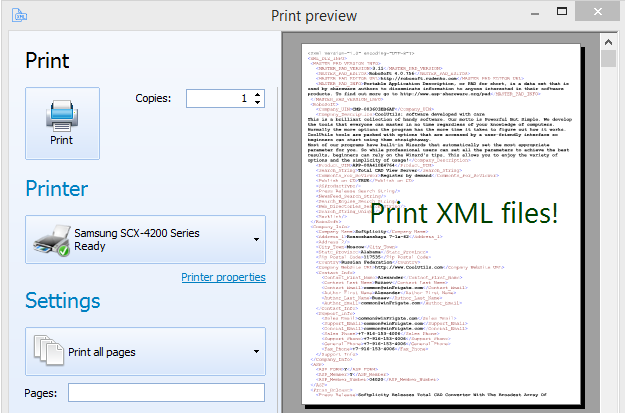
Print XML, JSON, or FO files directly from the viewer with formatted output. Useful for creating hard copies of configuration files or documentation.
Optimized for speed with minimal system resource usage. Loads large XML files instantly and runs smoothly even on older computers.
Trusted by professionals who work with structured data formats
Debug and analyze configuration files
Quickly examine XML configuration files, web service responses, and API data structures. Troubleshoot data format issues efficiently without heavyweight IDE tools.
Analyze web data and feed structures
View RSS feeds, sitemap files, and web service data. Understand complex data structures in web projects and validate markup formats.
Explore structured data formats
Analyze XML data exports from databases, examine survey data in XML format, and explore complex datasets with hierarchical navigation.
Manage system configuration files
View and analyze XML-based configuration files, log files, and system reports. Generate documentation reports for compliance and audit purposes.
Handle publishing workflows
Examine XML-based content management files, DITA documentation, and publishing workflows. Navigate structured content with ease.
Updated Sat, 22 Aug 2026
(only $59.90)
Explore and analyze your XML documents in 6 easy steps
Open the application from your desktop shortcut or Windows Start menu.
Navigate to the folder containing your XML, JSON or FO files using the left-side panel.
Click any XML file to view its hierarchical tree structure in the main panel.
Expand or collapse XML nodes to explore the document structure at any depth level.
Use sorting options to organize files by name, size, or modification date.
Access the reporting feature to analyze multiple XML files at once — export as PDF, CSV, XLS or HTML.
Updated Sat, 22 Aug 2026
(only $59.90)
Updated Sat, 22 Aug 2026
(only $59.90)
Download free trial and convert your files in minutes.
No credit card or email required.