Need help? Reach us at 

 +1 (855) 418-2323
Need help? Reach us at
+1 (855) 418-2323

 File Converters TIFF and PDF apps Forensic Freeware
The free MBOX viewer and reader that opens Thunderbird, Eudora, and Apple Mail archives on Windows without reinstalling any email client.

Windows
2000/2003/Vista
7/8/10/11/Citrix
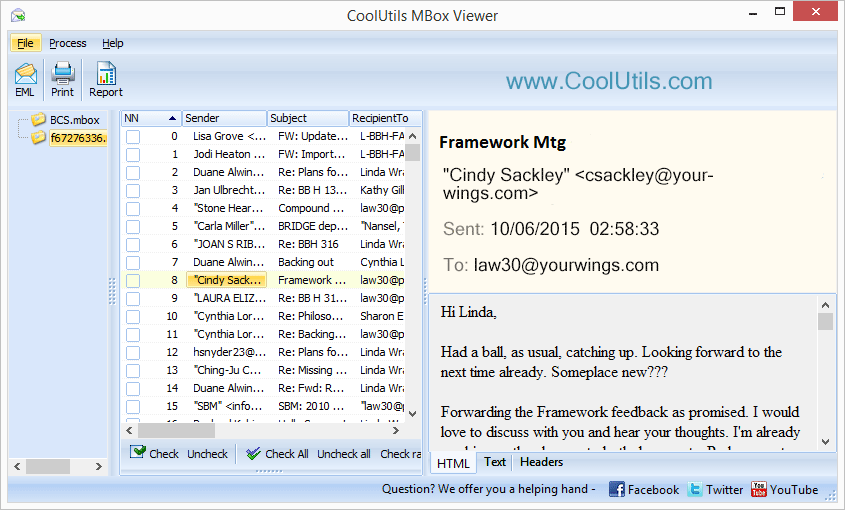
 CoolUtils MBOX Viewer is a free MBOX file viewer and reader that opens MBOX files from any email client — Thunderbird, Eudora, Entourage, Apple Mail — and displays all messages in a readable format. Search the full archive by sender, subject, or date, save individual emails as EML, or generate summary reports. It is a downloadable Windows program, not a browser upload tool: everything runs offline on your PC, so mail archives never leave your machine. Download the free MBOX viewer and access mail archives without any configuration.
Quick answer: To open an MBOX file without its email client, download the free CoolUtils MBOX Viewer and add your MBOX or MSF archive from Thunderbird, Eudora, Entourage, or Apple Mail. Browse the folder tree, click any message to read it, search by sender, subject, or date, then save emails as EML or generate PDF, CSV, TXT, XLS, or HTML reports — everything runs offline.
Browse the folder tree to navigate mail folders and subfolders. Click any message to read the full text, headers, and attachments. Batch export is supported for migrating large mail archives. Print selected emails — individually or hundreds at once.
Want to convert MBOX to PDF, DOC, TXT, or HTML? See the Total Thunderbird Converter.
CoolUtils MBOX Viewer is used by individuals migrating away from Thunderbird or Eudora, legal professionals reviewing archived correspondence, and IT teams exporting email archives for compliance purposes. It is 100% freeware — no ads, no toolbars, no paid Pro version for home users. Commercial users should apply for a commercial license.

"The Coolutils Mbox Viewer allows you to view MBOX in a decently quick fashion. We use it to view archived clients' emails and it works just fine. My only recomendation is to change the default action for attachments. Now the program tries to save it if I click on the attachment and I'd like it to open the attachment first. Thank you!"
 Martin Nielson, Legal Secretary
"Opens a large mbox files fine. The printing option sometimes goes wrong and print out only the firts page, please, fix that."
 David Wagner
Everything you need to work with MBOX files — completely free
No trial periods, no hidden Pro versions, no feature restrictions. Full functionality at zero cost for home users.
Open and read MBOX files without installing email clients. View emails from Thunderbird, Eudora, and Entourage instantly.
Download and use immediately without sign-ups or accounts. No personal data collection — just install and start viewing.
No advertisements, toolbars, or bundled software installations. A clean, focused tool that does exactly what you need.
Find emails by sender, subject, recipient, or date ranges. Quickly locate specific messages in large MBOX archives.
Save individual emails as EML files for import into other email applications like Windows Mail or Outlook Express.
Generate comprehensive reports in PDF, CSV, TXT, XLS, and HTML formats with email statistics and metadata.
View, save, and print email attachments with full support. Access documents, images, and files directly from the interface.
Powerful tools to view, search, and manage your MBOX email archives
Open MBOX files from any email client including Thunderbird, Eudora, Microsoft Entourage, and Apple Mail.
Navigate through complete email folder structure including Inbox, Sent, Drafts, and custom folders.
Find specific emails instantly using advanced search filters. Search by sender, subject, recipient, date range, or any combination of criteria to locate messages in large archives.
View, save, and print email attachments including documents, images, and multimedia files. Preview attachment contents without extracting files to disk.
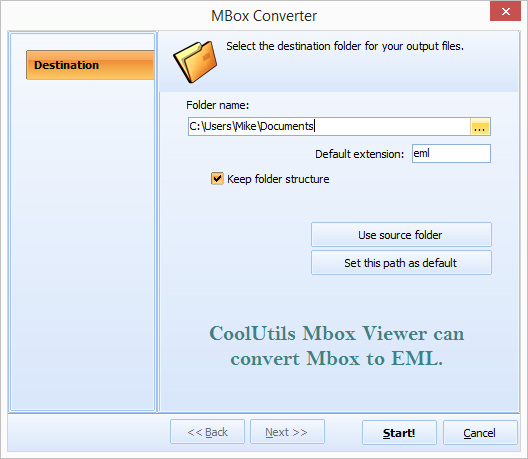
Save individual emails as EML files for easy import into Windows Mail or other email applications. Preserve all email formatting and metadata during export.
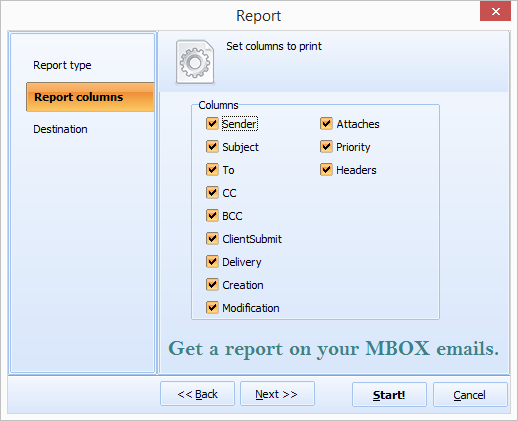
Create detailed reports about MBOX file contents in multiple formats (PDF, CSV, TXT, XLS, HTML). Include email statistics, folder analysis, and custom column selections.
Print individual emails or batch print multiple messages. Customize print layouts and include or exclude headers, attachments, and other elements as needed.
Quick loading and responsive interface even with large MBOX files. Minimal system resource usage allows smooth operation on older computers with limited RAM.
Trusted by professionals and home users for email archive management
Review email evidence for litigation, regulatory compliance, and legal discovery processes. Search and export relevant communications while maintaining chain of custody.
Access and recover emails from backup archives during migrations between email platforms. Troubleshoot user email issues without restoring entire mailboxes.
Examine email archives for investigations, track communication patterns, and extract evidence. Generate detailed reports with metadata for forensic documentation.
Access archived business communications, review historical correspondence, and retrieve important contracts or agreements from email backups.
Read old emails from Thunderbird or other clients after switching to a new email provider. Access personal archives and recover important messages and attachments.
| Full Software Name | Coolutils Mbox Viewer |
| Description | A free utility to open and view MBOX email files without installing a full email client. Supports large files and works entirely offline. |
| Processor | 1.8 GHz or faster |
| RAM | Minimum 2 GB (4 GB recommended) |
| Minimum Hard Drive Space | 35 MB |
| Operating System | Windows 7 / 8 / 10 / 11 (32-bit and 64-bit) |
| Trial version | No trial needed — Mbox Viewer is completely free to use. |
Updated Wed, 07 Oct 2026
(only $49.90)
Open, browse and manage your MBOX emails in 7 easy steps
Open the application from your desktop shortcut or Windows Start menu.
Click “Add Files” or drag-and-drop your MBOX files directly into the application window.
Navigate through email folders like Inbox, Sent, and Drafts in the left panel tree.
Click on any email to view its content, headers, and attachments in the right panel.
Use the search function to find emails by sender, subject, recipient, or date.
View and save email attachments directly from the interface — images, documents, and more.
Create comprehensive PDF, CSV, XLS or HTML reports about your MBOX file contents.
Updated Wed, 07 Oct 2026
(only $49.90)
Updated Wed, 07 Oct 2026
(only $49.90)
Download free trial and convert your files in minutes.
No credit card or email required.