Need help? Reach us at 

 +1 (855) 418-2323
Need help? Reach us at
+1 (855) 418-2323

 File Converters TIFF and PDF apps Forensic Freeware
The free PDF reader for Windows that opens multiple documents at once, generates thumbnails, and requires no registration.
Windows
2000/2003/Vista
7/8/10/11/Citrix
CoolUtils PDF Reader lets you open, view, and search PDF files without paying for Adobe Acrobat. The software displays multiple PDFs as thumbnails for quick browsing, supports full-text search across documents, and runs on all Windows versions. Download the free PDF reader once and keep it forever — no subscription, no account required.
Quick answer: To view PDF files without Adobe Acrobat, download the free CoolUtils PDF Reader and open a folder of PDFs. Browse them as adjustable thumbnails or as a detailed list showing author, page count, and size, run a full-text search for any word or phrase across documents, and export reports to PDF, TXT, or XLS — free for personal use.
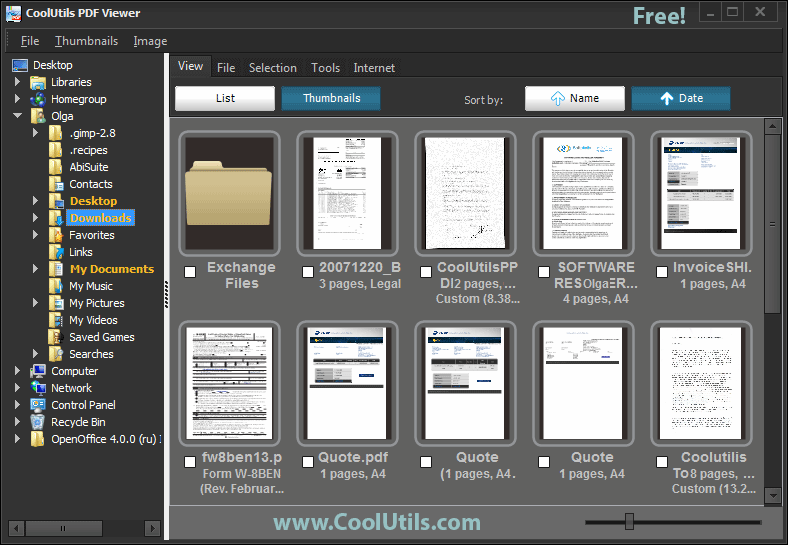
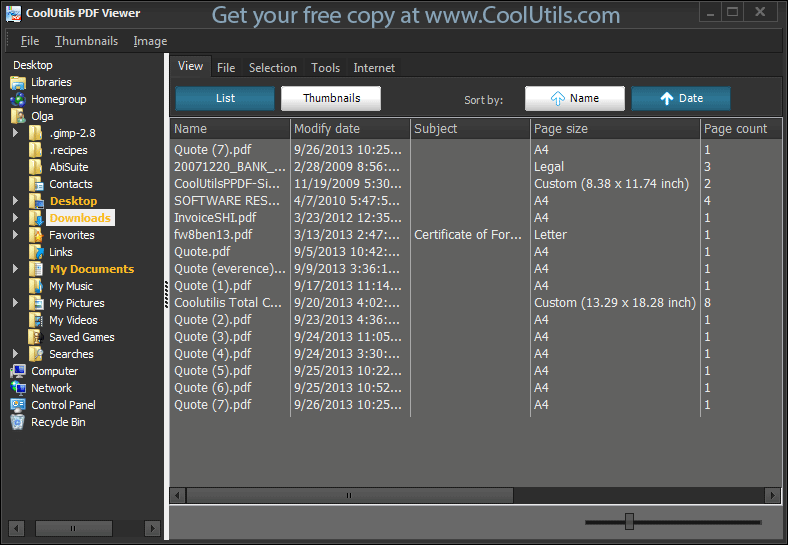
View all PDF files in a folder on one screen using adjustable thumbnail sizes, or switch to list view with full metadata: modify date, author, subject, title, page size, and page count. The built-in full-text search finds any word or phrase across your entire document collection instantly.
The reporting feature answers common questions — how many PDF files are in a folder, what their total size is, how many pages each has, and what orientation they use. Reports can be exported to PDF, TXT, XLS, or other formats.
CoolUtils PDF Viewer is used by office workers managing large document archives, researchers browsing PDF collections, and anyone who needs a lightweight alternative to Adobe Reader. It runs on Windows 7, 8, 10, and 11 with minimal system requirements.

"User-friendly, fast, looks nice. Like all of the other softwares you made. Let me know if you want them in Hungarian."
 Joel
Joel
"I'm impressed with your free PDF Viewer. I've not found anything else like it that can view a large number of PDF's in n-up format."
 Harry Cooper
A lightweight, blazing-fast alternative to bloated PDF readers
No subscriptions, no hidden fees. Every feature is available at zero cost — no "upgrade to Pro" prompts, ever.
Instant thumbnail generation for large PDF collections. Browse hundreds of documents without waiting.
View hundreds of PDFs simultaneously as thumbnails or in a detailed list. No need to open files one by one.
Only 12 MB installation vs 150 MB+ competitors. Minimal footprint, maximum performance on any system.
Download and use immediately. No sign-ups, no accounts, no personal data collection — just install and go.
Comprehensive PDF statistics unavailable elsewhere — file count, page totals, sizes, metadata — exportable to PDF, TXT, or Excel.
Works without internet connection. Your documents stay private and secure on your local machine — nothing is uploaded.
Native Windows integration and performance. Runs smoothly on Windows 7 through 11, including older hardware.
Powerful tools to view, search, and manage your PDF document collections
View entire folders of PDFs as adjustable thumbnails. Quickly browse through hundreds of documents without opening each file individually.
Search across all PDFs in a folder simultaneously. Find specific words, phrases, or data instantly without opening individual files.
Access detailed metadata unavailable in basic readers: file size, page count, creation/modification dates, author, subject, title, and page dimensions.
Generate comprehensive reports about your PDF collections. Get statistics on total files, combined page count, storage size, and more.
Open and manage hundreds of PDF files simultaneously. No need to switch between windows or tabs — see everything at once.
Optimized for speed and efficiency. Generate thumbnails and load documents instantly, even on older systems. Only 12MB vs 150MB+ competitors.
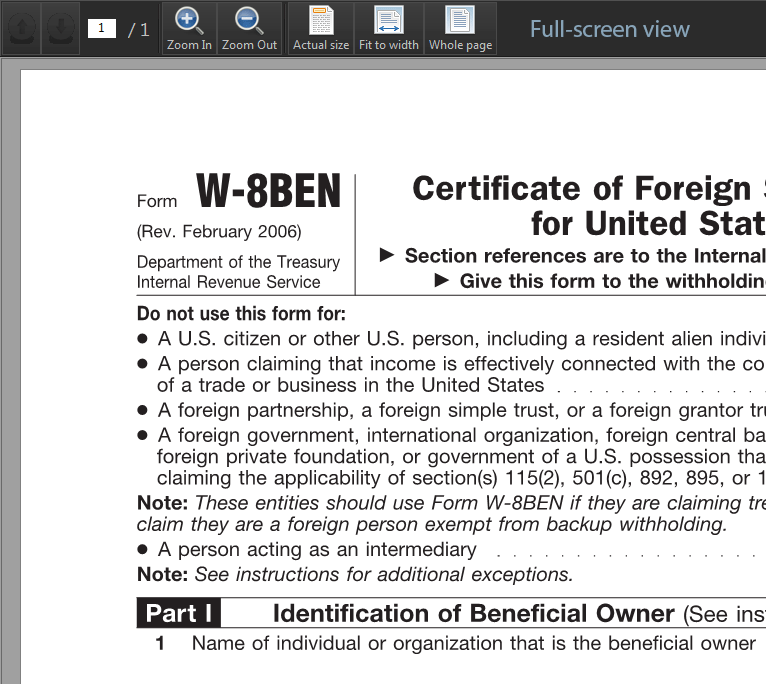
Switch between thumbnail grid, detailed list, and full-screen view modes. Choose the layout that works best for your workflow.
Works completely offline without internet connection. Your documents stay private and secure on your local machine.
Trusted by professionals across industries who manage large PDF collections
Organize research papers and textbooks
Managing hundreds of academic PDFs becomes effortless. Quickly browse through research papers as thumbnails, search for specific citations across your entire library, and organize materials by subject or semester.
Manage document collections efficiently
Handle contracts, invoices, reports, and proposals with ease. View entire project folders at once, quickly locate specific documents, and generate comprehensive reports for audits or reviews.
Quick case file browsing and discovery
Navigate case files containing hundreds of exhibits, depositions, and briefs. Search across all documents for evidence, precedents, or specific testimonies. Organize files chronologically or by document type.
Project document overview and management
Manage technical drawings, specifications, blueprints, and project documentation. Preview large-format PDFs as thumbnails, quickly access drawing revisions, and maintain organized project archives.
Academic paper organization and analysis
Organize research papers, journal articles, and conference proceedings. Search literature for specific methodologies or findings, track publications by author or institution, and maintain comprehensive research libraries.
Updated Sat, 12 Sep 2026
(only $39.90)
View, search and manage your PDF documents in 5 easy steps
Open the application from your desktop shortcut or Windows Start menu.
Navigate to the folder containing your PDF files using the left-side folder tree panel.
Switch between thumbnail grid, single-page view, or full-screen mode to suit your workflow.
Use the search bar to find specific words or phrases across your PDF documents instantly.
Access the reporting feature from the top menu — export as PDF, CSV, XLS or HTML.
Updated Sat, 12 Sep 2026
(only $39.90)
Updated Sat, 12 Sep 2026
(only $39.90)
Download free trial and convert your files in minutes.
No credit card or email required.