Logo
Home Products Support Contact About Us
arrow1 File Converters
arrow1 TIFF and PDF apps
arrow1 Forensic
arrow1 Freeware

Total XML Converter Tool

XML to JSON, XML, CSV, PDF via GUI or command line

Total XML Converter - Download XML Converter Software

Windows
2000/2003/Vista
7/8/10/11/Citrix

Total XML Converter converts XML to CSV, JSON, PDF, HTML, XLS, XLSX, DBF, SQL, TXT and other formats in batch. It handles complex XML structures, supports XSLT transformation, and processes entire folders while preserving hierarchy.

  • Total XML Converter supports XSLT transformation — add your XSLT stylesheet for custom output.
  • Format XML into human-readable form or compact it for production use.
  • Convert XML files via command line or graphic user interface.
  • Supports sophisticated XML documents and keeps the original structure intact.
  • Also supports YAML, SML, FO, and JSON as input formats.
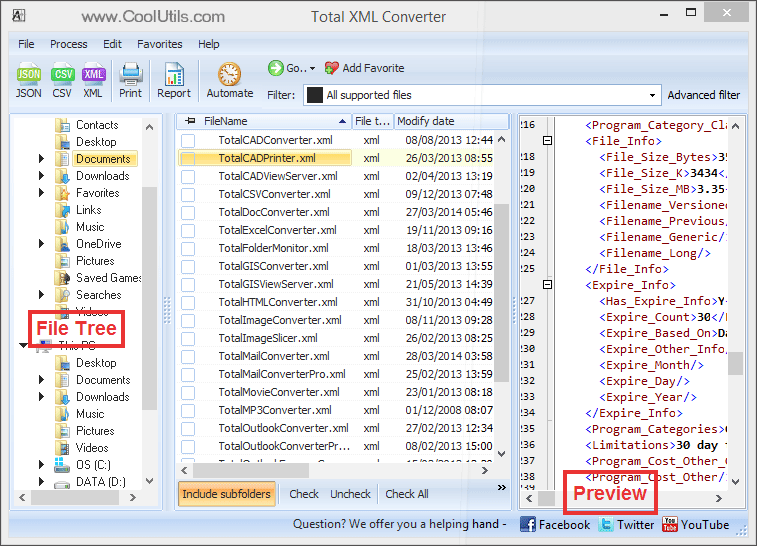
  • Preview XML data before conversion — check structure and content first.

For servers, use the command-line XML converter (no GUI, no interruptions). Works on Windows 7/8/10/11. 30-day free trial, no registration required. $59.90 lifetime license.

Desktop XML Converter vs Online Tools

FeatureTotal XML ConverterOnline Services
Batch conversion (hundreds of files)Yes1–3 files per upload
File size limitNoneUsually 5–50 MB
Output formats10+ (CSV, JSON, PDF, XLS, SQL, DBF...)Usually CSV or JSON only
XSLT transformationYesRarely
Privacy (data stays local)YesUploaded to third-party servers
YAML / FO / SML inputYesNo
XML formatting / minificationYesSome
Command-line automationYesNo
Folder structure preservedYesNo
Pricing$59.90 one-timeMonthly subscription or per-file
Download Now!

(includes 30 day FREE trial)

Buy License

(only $59.90)

 
Accept Payment Methods

quote

Total XML Converter Customer Reviews 2026

Rate It
Rated 4.7/5 based on customer reviews
5 Star

"That's the only XML converter to properly convert my files with XSLT style sheet. (and I have tested at least 5 of them). I recommend this app to my friends."

4.5 Star Mark Spacer IT manager

"I wanted to create PDF documents from XML data source and Total XML Converter proved to be a good solution. It didn't require much of the systems resources, worked fast and the output PDF files were neat. Thank you!"

5 Star Howard Manlisch HMI LLC.


Unique options of Total XML Converter


xml converter
Total XML Converter converts XML files to the widest list of output file formats: PDF, JSON, CSV, TXT, HTML, XLSX, SQL, XML, RTF, DOC, TIFF, JPEG, PNG, ACCESS, DBF.

xml
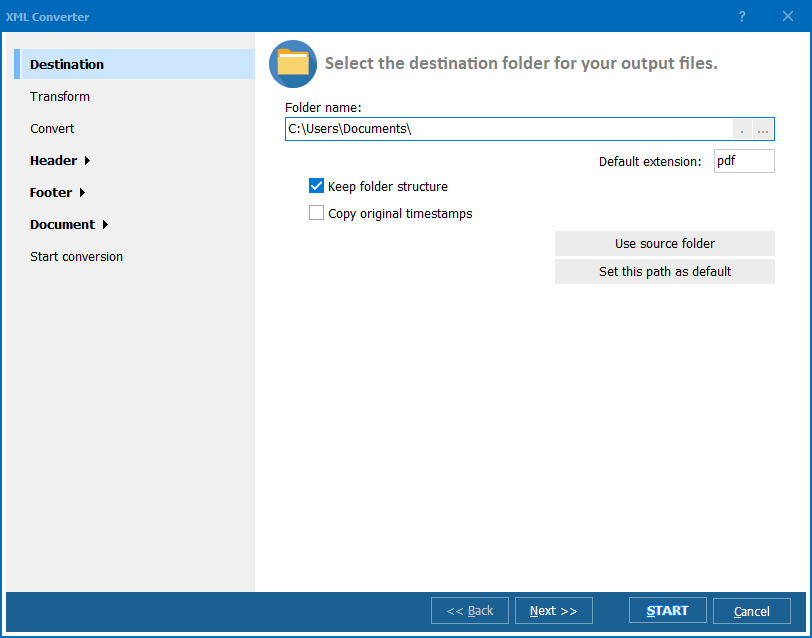
If you have an XSLT file, you can add to the app for the right transformation.

how to convert xml
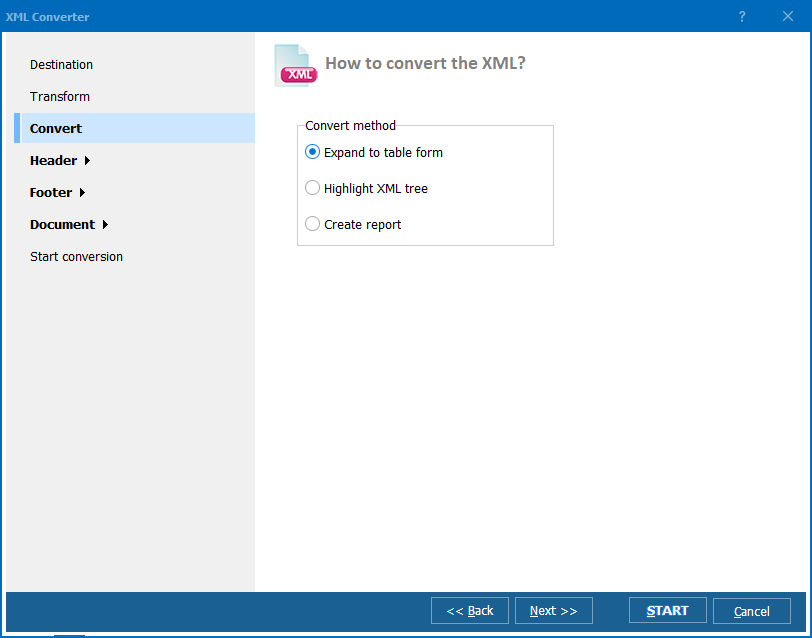
Convert XML in 3 ways: expand to table form, highlight XML tree or create a report.

page counter stamps
Add the page counter or any text watermark to each page of the output file.

office
Our batch XML converter is very flexible: you can rely on default settings or change any of them to your needs.

xml pdf
Convert XML to PDF and add security settings (user permissions, passwords, digital signature, etc.)

interface
During conversion all XML elements are transferred with the utmost accuracy.


interface
The interface is straightforward and good for both beginners and advanced users.

xml
With Total XML Converter you can extract images from XML files. Just one button for any number of files and you get the images in a new folder.

xml to json
When you convert XML to JSON, select compact (all text in one line) or indented (human readable) view.

xml to sql
Converting XML to SQL, you can select the SQL options (Ansi, Interbase, DB2, MySQL, Oracle, etc.)

/image header
Want to add your logo? Use the header option: add any image you like.

page
Our app converts xml file or several folders in one process so that you could save time.

XML CSV
Convert XML to CSV format and select comma and separator.

xml to csv
Combine tables from different XML files when you convert XML files to CSV.


command line
Total XML Converter can be run via command line ( you can get the command line from GUI in 1 click).

Who Uses Total XML Converter?

Anyone who needs to convert XML, JSON, YAML, or SML files to CSV, PDF, and other formats

Data Analysis

XML-to-CSV for Spreadsheets

Turn XML data exports into Excel-ready CSV files

Analysts convert XML data exports from APIs, databases, and enterprise systems into CSV files for analysis in Excel or Google Sheets. Total XML Converter handles sophisticated nested XML structures and preserves the original hierarchy, producing clean tabular data ready for pivot tables and charts.

Development & APIs

Format Transformation

Convert between XML, JSON, and YAML formats

Developers convert XML configuration files and API responses to JSON for web applications, or transform YAML and JSON back to XML for legacy system integration. XSLT transformation support lets you reshape data structure during conversion, and command line mode fits into development scripts.

Reporting & Documentation

XML-to-PDF Reporting

Generate PDF reports from XML data sources

Business teams convert XML reports from ERP, CRM, and financial systems into formatted PDF documents for management review, client delivery, or archival. Batch-convert entire folders of XML files while preserving folder structure, and apply XSLT stylesheets to control the final report layout.

Quality & Debugging

XML Formatting & Inspection

Pretty-print or minify XML for review and debugging

Developers and QA teams use Total XML Converter to format raw XML into human-readable indented form for inspection and debugging. Conversely, minify verbose XML to reduce file size before transmission. Process batches of XML files at once and verify data integrity across large document sets.

System Integration

Cross-Platform Data Exchange

Bridge systems by converting XML, SML, and FO files

IT teams convert data between systems that require different formats. Turn XML feeds into CSV for import into databases, convert FO files to PDF for distribution, or transform SML into JSON for modern web services. Command line support enables scheduled batch conversions as part of automated data pipelines.

Download Now!

Updated Thu, 02 Apr 2026

Buy License

(only $59.90)


Screenshots


Total XML Converter Preview1
Total XML Converter Preview2
Total XML Converter Preview3

Frequently Asked Questions About XML File Conversion ▼

Total XML Converter supports multiple output formats including CSV, JSON, PDF, TXT, HTML, XLS, and DOC. It helps transform raw XML data into more readable or editable formats for reports, databases, or web content.
Yes. Total XML Converter can handle both simple and complex XML structures. You can customize how nested elements are flattened or visualized during conversion to suit your data needs.
Absolutely. You can apply your own XSLT stylesheet during conversion, allowing full control over how the XML data is processed and displayed in the final output.
Yes, the converter supports batch processing. Simply select a folder or multiple files, and Total XML Converter will convert them all in one go, saving you time.
Yes, Total XML Converter offers full command-line support, making it ideal for automated tasks, server-side processing, or integration into scripts and workflows.
No. All conversions are performed locally on your machine. Your XML data stays private and secure — it's never uploaded to the cloud.
Yes, the built-in viewer lets you see how the converted file will look before processing, helping you fine-tune settings and avoid errors.
Download Now!

Updated Thu, 02 Apr 2026

Buy License

(only $59.90)


Complete list of supported XML conversions

  • FO to PDF
  • FO to JSON
  • FO to XML
  • FO to CSV
  • FO to DOC
  • FO to XLSX
  • FO to ODS
  • FO to RTF
  • FO to HTML
  • FO to XHTML
  • FO to JPEG
  • FO to TIFF
  • FO to TXT
  • FO to Text
  • FO to SQL
  • FO to XML
  • FO to DBF
  • FO to PCL
  • FO to SVG
  • FO to Access
  • FO to MSSQL
  • FO to MySQL
  • FO to XPS
  • JSON to PDF
  • JSON to JSON
  • JSON to XML
  • JSON to CSV
  • JSON to DOC
  • JSON to XLSX
  • JSON to ODS
  • JSON to RTF
  • JSON to HTML
  • JSON to XHTML
  • JSON to JPEG
  • JSON to TIFF
  • JSON to TXT
  • JSON to Text
  • JSON to SQL
  • JSON to XML
  • JSON to DBF
  • JSON to PCL
  • JSON to SVG
  • JSON to Access
  • JSON to MSSQL
  • JSON to MySQL
  • JSON to XPS
  • YAML to PDF
  • YAML to JSON
  • YAML to XML
  • YAML to CSV
  • YAML to DOC
  • YAML to XLSX
  • YAML to ODS
  • YAML to RTF
  • YAML to HTML
  • YAML to XHTML
  • YAML to JPEG
  • YAML to TIFF
  • YAML to TXT
  • YAML to Text
  • YAML to SQL
  • YAML to XML
  • YAML to DBF
  • YAML to PCL
  • YAML to SVG
  • YAML to Access
  • YAML to MSSQL
  • YAML to MySQL
  • YAML to XPS
  • SML to PDF
  • SML to JSON
  • SML to XML
  • SML to CSV
  • SML to DOC
  • SML to XLSX
  • SML to ODS
  • SML to RTF
  • SML to HTML
  • SML to XHTML
  • SML to JPEG
  • SML to TIFF
  • SML to TXT
  • SML to Text
  • SML to SQL
  • SML to XML
  • SML to DBF
  • SML to PCL
  • SML to SVG
  • SML to Access
  • SML to MSSQL
  • SML to MySQL
  • SML to XPS

List of supported XML online conversions:

Release Notes

  • 12 June 2025 Improved support for NDJSON format conversion.

Start working now!

Download free trial and convert your files in minutes.
No credit card or email required.

⬇ Download Free Trial Windows 7/8/10/11 • 85 MB
Pro Suite

Key Features Of Full Registered Version

  • XML to CSV, JSON, PDF
  • YAML to CSV, JSON, PDF
  • JSON to CSV, JSON, PDF
  • FO to CSV, JSON, PDF
  • XSLT transformation
  • XML into human-readable form
  • Flexible settings
  • Clear user interface
  • Command line support
  • ActiveX and Server version
  • Windows 10/11/Citrix compatible

Supported Formats

System Requirements


Related Topics

Copyright 2003-2026 CoolUtils Development. All rights reserved.