Need help? Reach us at 

 +1 (855) 418-2323
Need help? Reach us at
+1 (855) 418-2323

 File Converters TIFF and PDF apps Forensic Freeware
View PCL Files For Free Full-screen Or Thumbnails
Windows
2000/2003/Vista
7/8/10/11/Citrix
Imagine how much time and money you'd save if you could view PCL files instead of being forced to print them? Here at CoolUtils we have been developing file converters for over 20 years. We already have a technology to process PCL files in Total CAD Converter. So we released a free PCL Viewer for our users to view and organize PCL files with ease.
Quick answer: CoolUtils PCL Viewer opens PCL, PRN and PXL files without a printer or costly software — browse them as adjustable thumbnails or full-screen, sort, copy, move or rename in one click, email them as attachments, and convert PCL to PDF or TIFF. It works offline and is free for home use.
Most PCL viewers cost a fortune. Not at CoolUtils. We release a free PCL viewer for home users based on our existing technology. No paid upgrades, no built-in toolbars, no proprietary tools needed. View PCL files as tiles or full-screen at no cost. Commercial use.
| Feature | CoolUtils PCL Viewer | Paid PCL Viewers |
|---|---|---|
| Price | Free (home use) | $100–$500+ |
| View PCL, PRN, PXL files | Yes | Yes |
| Thumbnail & full-screen view | Yes | Usually yes |
| Convert PCL to PDF/TIFF | Yes | Some |
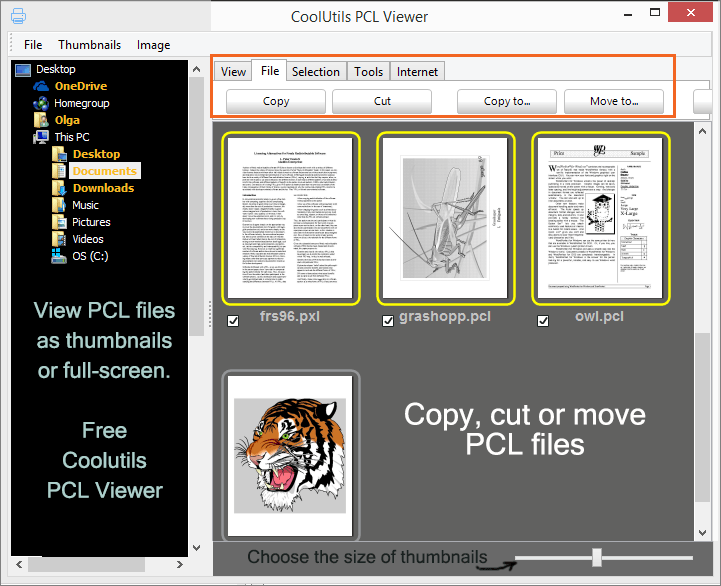
| File organization (copy, move, rename) | Yes | Rarely |
| Email PCL as attachment | Yes | Rarely |
| Works offline | Yes | Yes |
| No registration required | Yes | Usually requires license key |
| Download size | ~10 MB | 50–200 MB |
| Command-line support | Yes | Some |

" I kind of like the layout, but the conversion leaves something to be desired. Viewing a PCL file, it'd be nice if there was a sort of area zoom where I can drag and select an area and it'll zoom for me. Some sort of grid might be nice too for detailed work at the dot level (selectable like 300dpi, 600dpi, etc."
 Joel
Joel
"Excellent. I convert documents and although I don't use PCL much when I do I need a good viewer, and this is it! Images etc all come out perfectly. And it's free!"
 Ted
Ted
The fastest free way to view and manage PCL print files
No subscriptions, no hidden fees, no credit card required. All features fully unlocked at zero cost.
Instant PCL rendering for large print files. Opens 100+ page documents in seconds with no loading delays.
No email signup, no account creation, no personal data collection — just download and use immediately.
Works completely offline without internet connection. All processing done locally on your PC — your files never leave your computer.
Native support for PCL3, PCL5, PCL6/XL, PRN, and PXL files from HP, Canon, Xerox, Ricoh, and all PCL-compatible printers.
Automate workflows with a powerful command line interface. Integrate with batch scripts, scheduled tasks, and print server automation.
Professional tools for viewing, navigating, and managing PCL print files
View PCL3, PCL5, PCL6/XL files natively without conversion. Instant rendering with accurate formatting, fonts, and graphics preservation from HP, Canon, Xerox, and other PCL-compatible printers.
Open PCL, PRN, PXL, and RAW printer files from any PCL-compatible device. Support for all PCL variants ensures compatibility with legacy and modern print systems across different manufacturers.
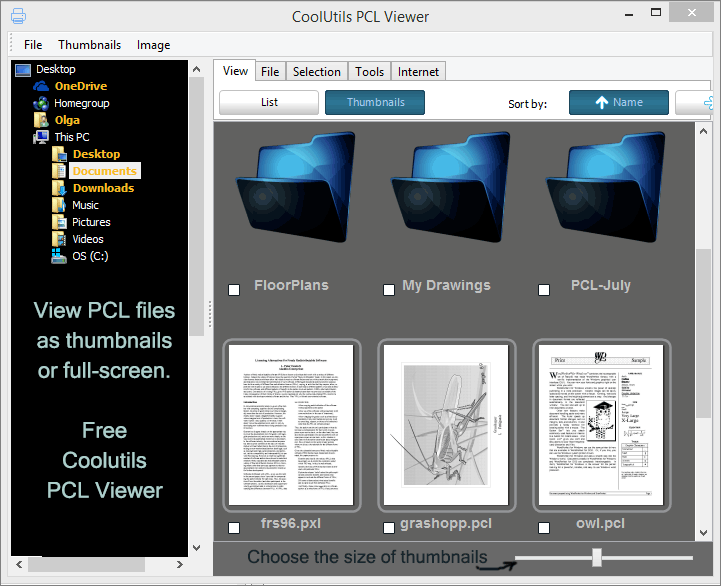
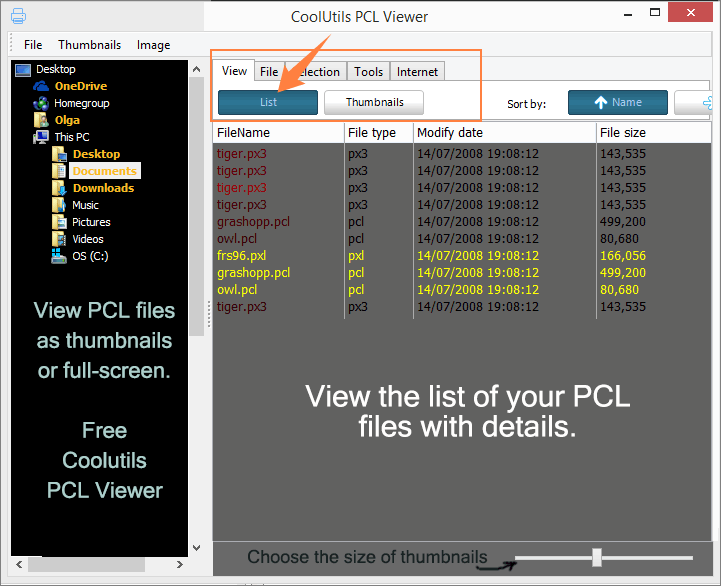
Switch between thumbnail grid, single page, and multi-page view modes. Adjust zoom, rotate pages, and choose layouts that match your workflow for optimal document review.
Automate PCL processing with comprehensive command line support. Integrate with batch scripts, scheduled tasks, PowerShell workflows, and print server automation.
Jump to specific pages instantly with thumbnail sidebar navigation. View page counts, dimensions, and print settings at a glance. Navigate large multi-page PCL documents efficiently with keyboard shortcuts.
Only 10 MB installation size. Instant startup, minimal memory usage, and smooth performance even on older systems with 2 GB RAM.
All file processing happens locally on your computer with no internet connection required. Complete privacy and security — your print files never leave your machine.
Context menu integration for right-click file opening. Windows Explorer thumbnail previews. Seamless integration with Windows 7, 8, 10, and 11 operating systems.
Preview print jobs before sending to expensive production printers. Verify layouts, check for formatting errors, and confirm page counts. Save costly reprints by catching issues early in the workflow.
Trusted by professionals across industries that rely on PCL print files
Streamline print job workflows and quality control
Handle high-volume print production with confidence. Preview PCL print jobs before sending to press, verify CMYK color separations and spot colors, check page counts and layouts, convert PCL files to PDF for client approvals, and archive completed jobs in accessible formats.
Manage print servers and troubleshoot printer issues
Troubleshoot printer problems efficiently by viewing raw PCL output from print queues. Monitor and analyze print server logs, verify print job formatting before distribution, convert legacy PCL archives to modern formats, and automate print job processing with command line integration.
Archive and manage corporate print documents
Review print jobs before sending to production printers, manage document retention policies, and ensure compliance with record-keeping requirements.
Handle court documents and legal print files
Manage court documents, depositions, and legal briefs captured as PCL print files from legacy systems. Verify document formatting before court submission, archive case files in standardized formats, and ensure print quality for official legal documents.
Process shipping labels and production reports
Handle barcode labels, packing slips, and production reports generated as PCL files from warehouse management systems. Verify label formatting before mass printing, archive shipping documentation for compliance, batch convert production reports to PDF for distribution, and integrate with automated logistics workflows.
Archive official documents and public records
Digitize and preserve official government documents, public records, and archived reports stored as PCL print files. Meet document retention and accessibility requirements, ensure compliance with freedom of information requests, and maintain security with offline processing of sensitive government data.
Updated Thu, 08 Oct 2026
(only $39.90)
Get started in just 4 simple steps
Open PCL Viewer from your desktop shortcut or Windows Start menu.
Click "Open" button and select your PCL, PRN, or PXL files — supports all PCL variants (PCL3/5/6/XL).
Switch between thumbnail grid, single page, or multi-page view to match your workflow needs.
Select multiple files or entire folders for batch conversion — process up to 1,000 files automatically.
Updated Thu, 08 Oct 2026
(only $39.90)
Updated Thu, 08 Oct 2026
(only $39.90)
Download free trial and convert your files in minutes.
No credit card or email required.