Logo
Home Products Support Contact About Us
arrow1 File Converters
arrow1 TIFF and PDF apps
arrow1 Forensic
arrow1 Freeware

DOC to DOCX Converter — Batch Convert Word Documents to Modern Format


Still working with old DOC files? Total Doc Converter upgrades them to DOCX quickly and accurately, preserving all formatting, images, and document structure. Our DOC to DOCX converter:
  • Preserves fonts, tables, images, headers, footers, and page layout
  • Converts hundreds of DOC files to DOCX in one batch
  • Works offline — no files uploaded to the cloud
  • Provides command-line interface for automation and scripting
  • Includes a 30-day free trial with no limitations

Download Total Doc Converter and modernize your Word document archive today.


Download Now!

(includes 30 day FREE trial)

Buy License

(only $49.90)

DOC vs DOCX: What Is the Difference?

DOC is a proprietary binary format introduced by Microsoft Word in 1983. For over two decades it was the default document format across the business world. DOC files use a compound binary structure (OLE) that stores text, formatting, images, and macros in a single binary blob. The format is fully supported only by Microsoft Word — other word processors open DOC files with varying degrees of accuracy.

DOCX replaced DOC as the default format starting with Word 2007. It is an Office Open XML format that stores document content as a ZIP archive of XML files. DOCX files are smaller (typically 50–75% of the equivalent DOC), open faster, and are less prone to corruption. The XML-based structure also makes them easier to process programmatically and more compatible with third-party applications.

While modern Word versions still open DOC files, certain features behave differently in compatibility mode. Embedded objects, complex tables, and advanced formatting may render incorrectly when a DOC file is opened in newer editors. Converting DOC to DOCX with a dedicated tool ensures a clean transition without layout shifts or data loss.
How to Convert DOC to DOCX

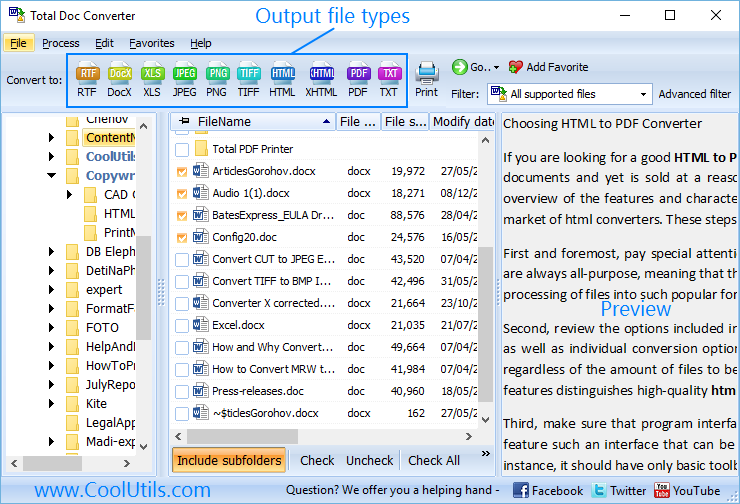
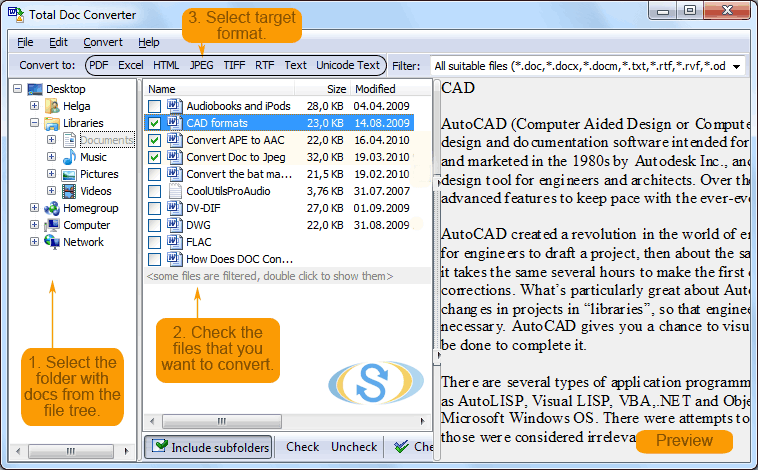
  • Step 1. Launch Total Doc Converter. The left panel displays a folder tree for quick navigation.
  • Step 2. Browse to the folder that contains your DOC files. The file list in the center shows all supported document types.
  • Step 3. Check the DOC files you want to convert. Use Check All to select every file in the folder for batch conversion.
  • Step 4. Click DOCX in the format toolbar at the top of the window.
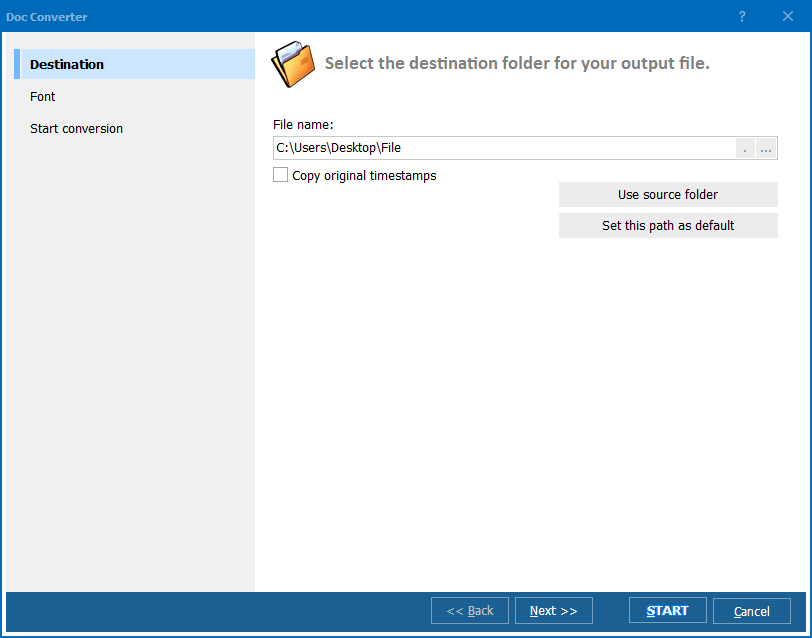
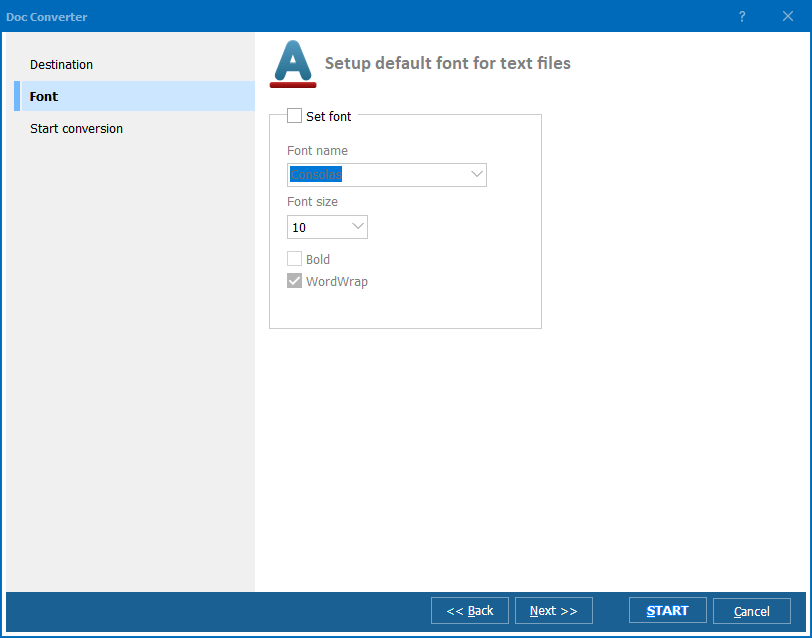
  • Step 5. Set the destination folder. Optionally add watermarks, headers, footers, or adjust page layout in the conversion wizard.
  • Step 6. Press Start. The converter processes all selected files and saves the DOCX output to your chosen folder.

Total Doc Converter - DOC to DOCX conversion interface

The entire conversion takes seconds, even for large batches. Your original DOC files remain untouched.

Command-Line Conversion

Total Doc Converter includes a command-line interface that lets you convert DOC to DOCX from scripts, batch files, or scheduled tasks. Example:

DocConverter.exe C:\Data\report.doc C:\Output\report.docx -c DOCX

Use wildcards to convert an entire folder in one command:

DocConverter.exe C:\Data\*.doc C:\Output\ -c DOCX

This makes it easy to integrate DOC-to-DOCX conversion into automated workflows, migration scripts, or server-side document processing. Write a .bat file once and reuse it whenever new DOC files appear.

Why Use Total Doc Converter?

Green PlusBatch processing. Select hundreds or thousands of DOC files and convert them to DOCX in a single run. No need to open each file in Word and re-save manually.

Green PlusFormatting preservation. Fonts, tables, images, headers, footers, page breaks, columns, and styles survive the conversion. Your DOCX files look just like the DOC originals.

Green PlusFolder structure support. When converting files across multiple subfolders, the converter recreates the original directory tree in the output location. No manual sorting required afterward.

Green PlusWatermarking. Add text or image watermarks during conversion — useful for marking documents as "DRAFT", "CONFIDENTIAL", or stamping them with your company logo.

Green PlusNo cloud uploads. All processing happens locally on your PC. Sensitive contracts, legal documents, and internal reports never leave your machine.

Green Plus20+ output formats. Besides DOCX, convert DOC to PDF, HTML, RTF, TXT, ODT, XHTML, JPEG, TIFF, and more — all from the same tool.

Online Converters vs Desktop Converter

FeatureOnline ToolsTotal Doc Converter
File size limit10–50 MBNo limit
Batch conversion1–5 files at a timeUnlimited
PrivacyFiles uploaded to cloud100% offline
SpeedDepends on connectionInstant (local)
AutomationNone or paid APIBuilt-in command line
Formatting qualityBasicFull preservation
WatermarksNot availableText and image
PricingSubscriptionOne-time $49.90

download DOC to DOCX converter

Windows 7/8/10/11 • 30-day free trial

When Do You Need DOC to DOCX Conversion?

There are several common scenarios where converting legacy Word documents to modern format is necessary:
  1. Office migration. Your organization is moving from Office 2003/XP to Microsoft 365. Thousands of old DOC files need to be upgraded to DOCX to avoid compatibility-mode limitations and take advantage of modern Word features.
  2. Reducing storage costs. DOCX files are significantly smaller than DOC files because of ZIP compression. Converting a 10 MB DOC archive to DOCX can cut storage requirements by half or more — especially noticeable on shared network drives with thousands of documents.
  3. Regulatory compliance. Government agencies and industry regulators increasingly require documents in Office Open XML format. Converting DOC files to DOCX ensures your submissions meet format requirements.
  4. Cross-platform compatibility. Google Docs, LibreOffice, and other word processors handle DOCX much better than DOC. If your team uses mixed software environments, DOCX is the safer interchange format.
  5. Document security. DOCX files do not support legacy macro formats (VBA macros in DOC files have been a common attack vector for malware). Converting DOC to DOCX and stripping macros improves document security.


Download Now!

(includes 30 day FREE trial)

Buy License

(only $49.90)


quote

Total Doc Converter Customer Reviews 2026

Rate It
Rated 4.7/5 based on customer reviews
5 Star

"We had 15,000+ DOC files accumulated over 20 years. Converting them one by one in Word was not an option. Total Doc Converter processed the entire archive in under an hour. Formatting, tables, and embedded images all came through perfectly in DOCX."

5 Star David Kravchenko IT Manager, Law Firm

"Our department switched to Microsoft 365 and needed all legacy documents in DOCX format. The batch conversion saved us weeks of manual work. The folder structure feature was a lifesaver — everything stayed organized exactly as before."

5 Star Angela Torres Office Administrator

"I set up a scheduled task with the command-line version to auto-convert any new DOC files dropped into a shared folder. Runs on our Windows Server without issues. The only thing missing is a Linux version, but the Windows command line covers our needs."

4 Star Martin Lindqvist Systems Administrator

FAQ ▼

Total Doc Converter offers a full-featured 30-day free trial with no limitations. During the trial you can convert as many DOC files to DOCX as you need. After the trial, a one-time license costs $49.90 — no subscription.
Yes. Fonts, tables, images, headers, footers, page breaks, columns, and styles are all preserved during the conversion. Your DOCX files look and work just like the DOC originals.
Yes. Total Doc Converter supports batch conversion. Select all DOC files in a folder (or use Check All), choose DOCX as the target format, and press Start. Hundreds of files are processed in seconds.
No. Total Doc Converter is a standalone application. It reads DOC files and writes DOCX files using its own engine — no Word, LibreOffice, or any other office suite is required on the machine.
Yes. When you convert DOC files from multiple subfolders, the converter recreates the original directory tree in the output location. You do not need to re-sort files manually after conversion.
Yes. Total Doc Converter includes a built-in command-line interface. You can automate DOC-to-DOCX conversion in batch scripts, scheduled tasks, or server-side workflows without any GUI interaction.
Completely. Total Doc Converter processes files locally on your computer. No data is uploaded to any cloud service or external server. Your documents never leave your machine.


Start working now!

Download free trial and convert your files in minutes.
No credit card or email required.

⬇ Download Free Trial Windows 7/8/10/11 • 84 MB

Friday Sale
Doc Converter Preview1
Doc Converter Preview2
Doc Converter Preview3

Latest News

Newsletter Subscribe

No worries, we don't spam.


© 2026. All rights reserved. CoolUtils File Converters

Cards