Need help? Reach us at 

 +1 (855) 418-2323
Need help? Reach us at
+1 (855) 418-2323

 File Converters TIFF and PDF apps Forensic Freeware
You have a folder of .xml files exported from Microsoft Excel 2003 and nothing on your machine knows how to open them. They are not regular XML, not XLSX, and Excel 2007 and later open them only with warnings — sometimes silently dropping formatting or formulas. Total Excel Converter reads Excel 2003 XML SpreadsheetML directly and converts it to XLSX, PDF, CSV, DOC, HTML, and 15+ other formats in batch. No Office install required. Original data, formulas, and table structure preserved.
Quick answer: To convert Excel 2003 XML files, install Total Excel Converter, browse to the folder with your SpreadsheetML .xml files, select them, pick a target format such as XLSX, PDF, or CSV from the toolbar, set output options, then click Start. The converter parses legacy SpreadsheetML natively in batch, keeps formulas and formatting, and needs no Office install.
(30 days, no email)
(from $49.90, perpetual)
Windows 7/8/10/11
Microsoft Excel 2003 introduced a saved-as option called XML Spreadsheet 2003, internally known as SpreadsheetML. It was Microsoft's first XML-based spreadsheet format, predating the Open Office XML (.xlsx) standard by several years. The file extension is .xml — the same as generic XML — which is why these files often confuse modern software. They are not .xlsx, not the OOXML format, not OpenDocument, and not generic XML data.
SpreadsheetML files contain workbook structure, sheet data, cell formulas, styles, and named ranges, encoded as XML elements in the urn:schemas-microsoft-com:office:spreadsheet namespace. Excel 2007 and later can still open them, but the support is partial: complex styles may downgrade, conditional formatting may be lost, and ActiveX or VBA artifacts are stripped. Many third-party tools refuse to open them at all because the extension matches generic XML and the dialect is unfamiliar.
| Excel 2003 XML (SpreadsheetML) | Modern XLSX | |
|---|---|---|
| Extension | .xml | .xlsx |
| Released | 2003 (Office 2003) | 2007 (Office 2007) |
| Container | Single XML file (plain text) | ZIP archive of XML parts |
| File size | Larger (verbose XML, no compression) | Smaller (compressed) |
| Modern tool support | Inconsistent; often opens with warnings | Universal |
| Formulas | Preserved as text | Preserved with calculation chain |
| Charts and pivot tables | Limited support | Full support |
| Macros | Not supported (text-only XML) | Supported in .xlsm variant |
Download the installer from the link above and run it. Setup takes under a minute. No Microsoft Office or .NET prerequisite — the converter ships with its own SpreadsheetML parser and output engine. It works equally well on machines that have never had Excel installed.
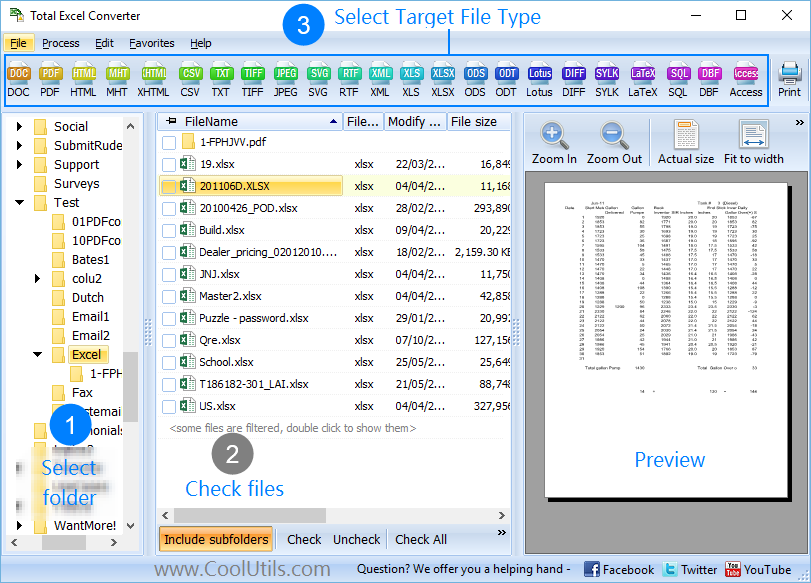
The left panel shows a Windows-style file tree. Navigate to the folder that holds your Excel 2003 XML files. The converter recognizes SpreadsheetML automatically and shows a preview of the first sheet so you can verify the file is what you expect. Use Ctrl+A to select every XML file in the folder, or tick individual files.
The output-format toolbar lists every supported destination. The most common choices for Excel 2003 XML files are:
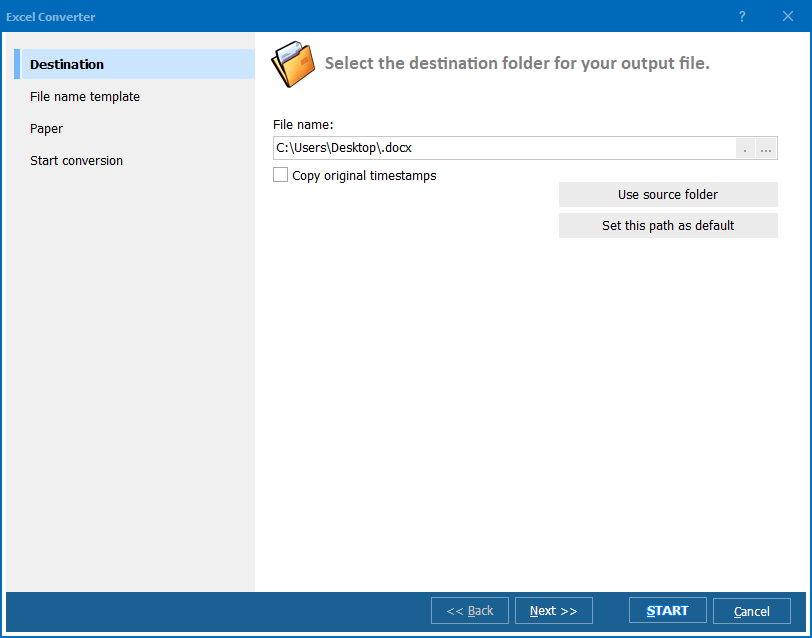
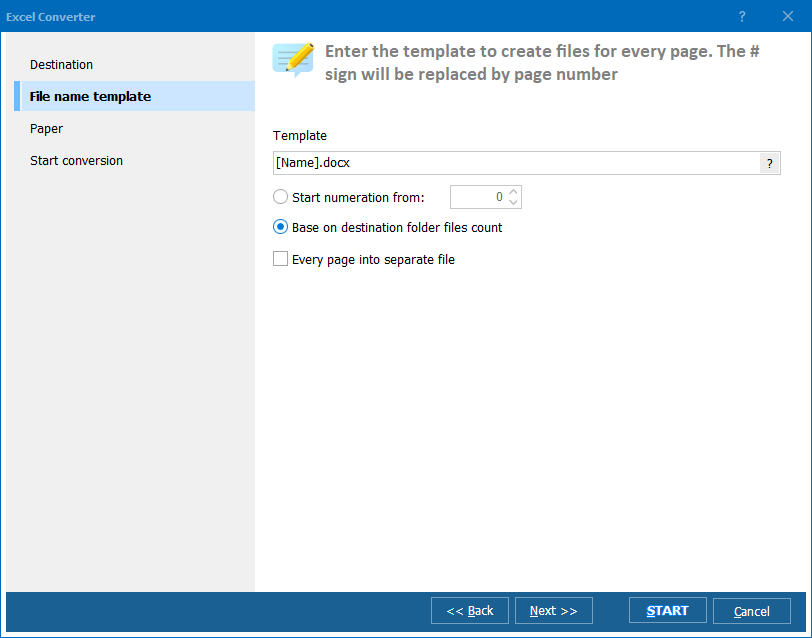
Each target format has its own options:
Click Start. Total Excel Converter processes every queued file. A progress bar shows the current file, the remaining count, and the elapsed time. When the batch finishes, a log file lists every conversion and any warnings (rare — usually a malformed SpreadsheetML file from a non-Microsoft producer).
The same converter runs from the command line. This lets you script bulk conversions, schedule them with Windows Task Scheduler, or wire them into a server-side ETL workflow.
ExcelConverter.exe "C:\Legacy\*.xml" "C:\Modern\" -c XLSX -log c:\Logs\xml2xlsx.log
The first argument is the source mask, the second is the output folder. The -c XLSX flag selects the target format. Replace it with -c PDF, -c CSV, -c DOC, etc. for other formats. The -log flag writes a conversion log so you can verify results without watching the console.
Save the command in a .bat file:
@echo off
"C:\Program Files\CoolUtils\TotalExcelConverter\ExcelConverter.exe" "D:\Archive\Excel2003\*.xml" "D:\Archive\XLSX\" -c XLSX -log D:\Logs\xml2xlsx.log
Schedule it with Task Scheduler to convert newly-arrived XML files automatically, or trigger it from a watch-folder service when files appear.
Microsoft Excel itself is the most common way to open Excel 2003 XML, but it has been removed from many modern desktops. Total Excel Converter parses SpreadsheetML natively, so you can run it on a clean Windows install or a server with no Office license.
Online converters and Excel itself handle one file at a time. Total Excel Converter loads thousands of XML files into a single queue and processes them unattended. Convert an entire archive folder in one run.
Files never leave your machine. Online converters require uploading every file to a third-party server — impractical for a large archive, and a privacy concern when the data is internal financial reports, customer lists, or anything else you would not email out unencrypted.
Excel 2007+ opens 2003 XML files inconsistently. Some open silently, some show warnings, some downgrade complex styles, some lose conditional formatting. Total Excel Converter applies a documented mapping from SpreadsheetML to each target format so the result is the same on every run.
The same install converts to XLSX, XLS, CSV, PDF, DOC, DOCX, HTML, ODS, TXT, JPG, TIFF, and more — in any direction. Today XML to XLSX, tomorrow XLSX to PDF, the next day CSV to JPG.
| Feature | Online Converters | Total Excel Converter |
|---|---|---|
| Batch processing | One file at a time, often size-limited | Unlimited files per batch |
| File privacy | Files uploaded to third-party server | Files never leave your machine |
| File size limit | Typically 10–50 MB per file | No limit |
| SpreadsheetML support | Inconsistent; some confuse it with generic XML | Native SpreadsheetML parser |
| Formula preservation | Often dropped or downgraded | Preserved across formats |
| Combine into single file | Not available | Built in for XLSX, PDF, DOC |
| Speed | Limited by upload bandwidth | Limited by local CPU only |
| Automation | Manual only | Command line, .bat, Task Scheduler |
| Requires internet | Yes | No |
.xml reports exported from Excel 2003. Modern tools (Excel 365, Google Sheets, Power BI) read them poorly or not at all. Bulk converting to XLSX makes the entire archive usable again..xml file from Excel 2003 will not know what to do with it. Converting XML to PDF gives them a fixed, printable document that opens anywhere.(30 days, no email or credit card)
(from $49.90, perpetual)
Windows 7/8/10/11 • Command line included
Download free trial and convert your files in minutes.
No credit card or email required.