Need help? Reach us at 

 +1 (855) 418-2323
Need help? Reach us at
+1 (855) 418-2323

 File Converters TIFF and PDF apps Forensic Freeware
Someone handed you a pile of invoices, contracts, and scans saved as JPEG, and now you need them in TIFF. JPEG compresses every save and softens the fine lines that archives, print shops, and fax systems demand, while TIFF keeps documents lossless and can hold many pages in a single file. Total Image Converter converts a whole folder of JPEG files to TIFF at once, so hundreds of documents are ready in minutes instead of hours.
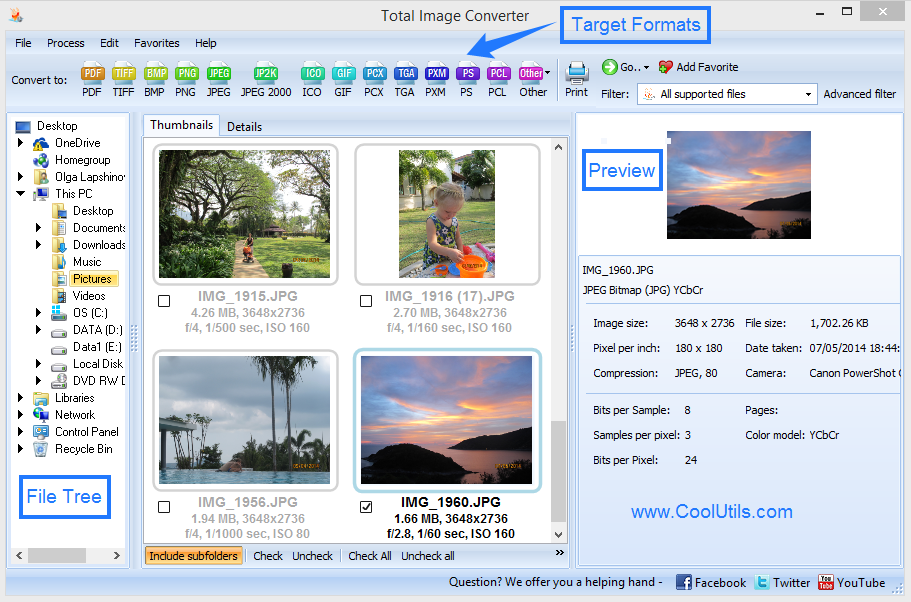
Quick answer: To convert JPEG to TIFF in batch, install Total Image Converter, open the folder with your JPEG files, check the images you want, click the TIFF button, choose the compression and whether to merge them into one multipage TIFF, then press Start. The entire folder converts offline in one run with no upload and no per-file work.
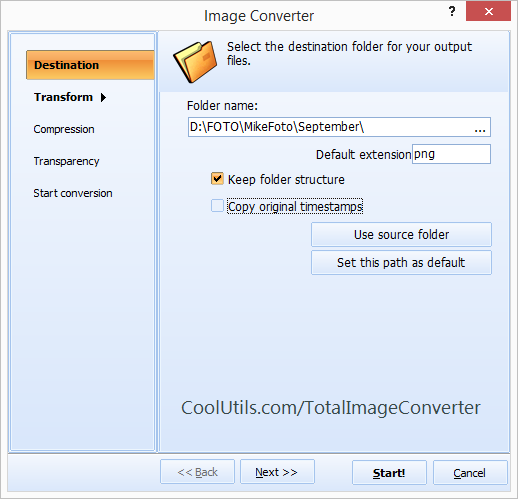
Open the folder of JPEG files in Total Image Converter. The built-in viewer shows a thumbnail of each image, so you confirm the right documents before you commit. Check the files, or check the whole list, and click the TIFF button. Pick the TIFF compression, decide whether each JPEG becomes its own TIFF or all of them merge into one multipage TIFF, and press Start. The program writes every result into the output folder you choose while you move on to other work.
Yes, and this is why offices switch to TIFF. Instead of shipping a partner twenty separate JPEG attachments, merge the scanned pages of a contract into a single multipage TIFF that opens as one document in order. Total Image Converter lets you set the page order and a file-name template, so a stack of loose JPEG scans becomes one clean archival file. For sharing the same pages as a portable document, it also does TIFF to PDF from the same file list.
JPEG re-compresses the image every time it is saved, and each pass throws away detail that thin text and signatures need. TIFF stores documents without that loss, supports lossless compression, and holds several pages in one file, which is why invoices, agreements, and legal scans belong in TIFF. Converting your JPEG originals to TIFF gives you a stable master copy that prints cleanly and archives safely for years.
For a fast run, keep the defaults: each JPEG becomes a separate TIFF named after the original. Switch on the merge option only when you want the pages of one document combined into a single multipage TIFF.
The command-line version lets you script JPEG to TIFF conversion in a .bat file or a scheduled task, so a server can process each new batch of scans on its own.
Total Image Converter runs on Windows 7, 8, 10, and 11. The 30-day trial is fully functional with no email or credit card, and a personal license starts at $24.90. It also works as a general JPEG converter for PNG, BMP, RAW, and more.
Download free trial and convert your files in minutes.
No credit card or email required.