Logo
Home Products Support Contact About Us
arrow1 File Converters
arrow1 TIFF and PDF apps
arrow1 Forensic
arrow1 Freeware

Convert RAW to JPEG


Your camera shoots gorgeous RAW files, but almost nothing opens them. RAW formats like CR2, NEF, ARW, DNG, ORF, and RAF are locked to specialist editors, refuse to attach to email, and will not display on the web. Converting them to JPEG makes every shot instantly viewable, shareable, and small. Total Image Converter turns a whole memory card of RAW photos into JPEG in one pass, so you never touch a file one by one.

Quick answer: To convert RAW to JPEG, install Total Image Converter, open the folder holding your CR2, NEF, ARW, DNG, ORF, or RAF files, check the shots you want, click the JPEG button, set the quality and size, then press Start. The whole folder converts offline in one batch, with no upload and no per-file clicking.

How do I convert RAW files to JPEG?

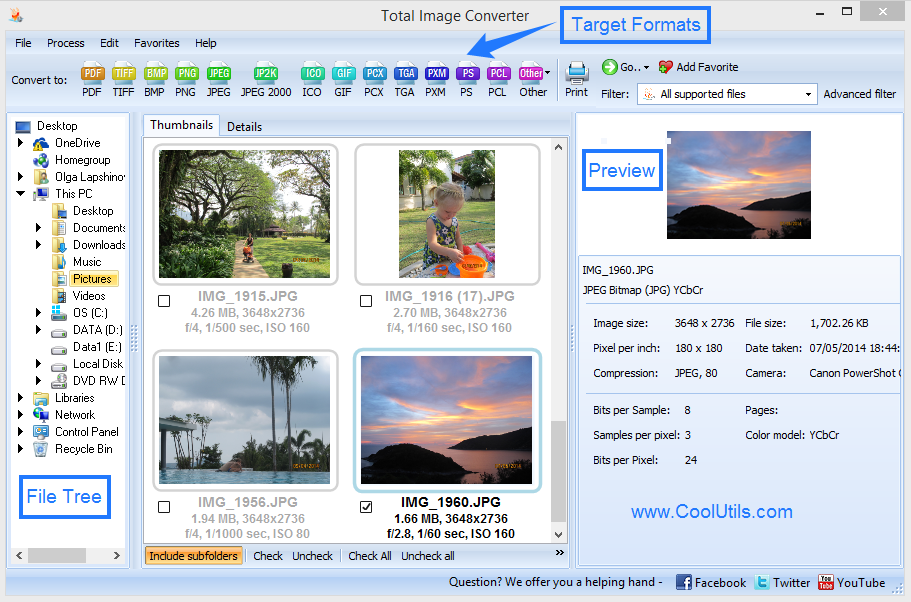
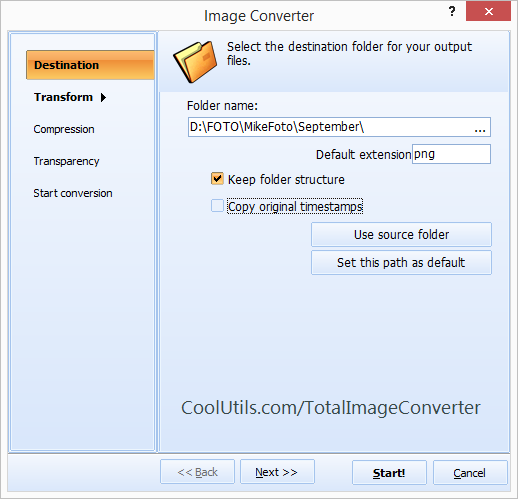
Point Total Image Converter at the folder where your camera dumped its RAW files. The built-in viewer shows a thumbnail of every shot, so you pick by picture, not by cryptic file name. Check the frames you want, click JPEG, and set the quality and dimensions. Press Start and the program writes a clean JPEG for each RAW original into the output folder you choose. A card of 400 frames finishes while you get coffee.

Which camera RAW formats does it read?

Total Image Converter reads the RAW files from all the major camera brands, including Canon CR2 and CR3, Nikon NEF, Sony ARW, Adobe DNG, Olympus ORF, Fujifilm RAF, Pentax PEF, and Panasonic RW2. You do not need the manufacturer software installed. Point the program at the folder, and it decodes each proprietary RAW format and saves a standard JPEG that opens anywhere.

  • Convert a whole card of RAW photos to JPEG in one batch
  • Resize the images so they fit web pages and email
  • Crop each shot before it is saved
  • Adjust JPEG quality to balance sharpness against file size
  • Add a watermark, logo, or date to protect your copyright
  • Preview every frame as a thumbnail before converting

Can I resize and watermark while I convert?

Yes. Before you press Start, set a target width and height and the program scales every RAW photo as it exports, which is ideal for web galleries and client proofs. Turn on the watermark option to stamp your name, studio logo, or the shoot date onto each JPEG. If you later need a print-ready archive of the same shots, Total Image Converter also handles TIFF to PDF and other high-quality formats from the same file list.

Keep the default settings for the fastest run: every RAW file becomes a separate JPEG at full quality, named after the original. Change the parameters only when you need smaller files or a fixed size.

A command-line version ships with the program, so you can wire RAW to JPEG conversion into a .bat script or a scheduled task and let a server process each new card automatically.

Total Image Converter runs on Windows 7, 8, 10, and 11. The 30-day trial is fully functional and asks for no email or credit card, and a personal license starts at $49.90. It is also a full JPEG converter for BMP, PNG, TIFF, and other sources.


quote

Total Image Converter Customer Reviews 2026

Rate It
Rated 4.7/5 based on customer reviews
5 Star

"After a wedding I come home with two cards full of Canon CR2 files that the couple cannot even open. I point Total Image Converter at the folder, set a web-friendly size, stamp my studio watermark, and hit Start. Six hundred RAW frames become shareable JPEGs while I edit the keepers, and the clients get a same-day preview gallery."

5 Star Marco Ferreira Wedding Photographer, Ferreira Studio

"Our contributors send Nikon NEF and Sony ARW files, and our CMS only accepts JPEG. Batch-converting a whole shoot in one run, with the thumbnails so I can drop the throwaways before conversion, saved me from opening each RAW in an editor. The quality control on the JPEG output is exactly what a newsroom needs."

5 Star Hannah Lindqvist Photo Editor, Northern Light Media

"I shoot listings in DNG and clients want JPEGs sized for their portals. The command-line version lets me drop a card into a watched folder and a script converts and resizes every RAW automatically overnight. It would be perfect with a few more resize presets, but for hands-off batch work it earns its keep."

4 Star Devin Okafor Real Estate Media Owner, Okafor Property Shots

Convert RAW to JPEG — FAQ ▼

How do I convert RAW to JPEG?

Install Total Image Converter, open the folder with your CR2, NEF, ARW, DNG, ORF, or RAF files, check the shots you want, click the JPEG button, set quality and size, then press Start. Each RAW file is saved as a standard JPEG in the output folder you pick.

Can I convert RAW to JPEG in batch?

Yes. Total Image Converter is built for batch work. Point it at the folder from your memory card, check every frame, and it exports the whole set to JPEG in one run without repeating the steps for each photo.

Which camera RAW formats are supported?

Total Image Converter reads RAW from all the major brands, including Canon CR2 and CR3, Nikon NEF, Sony ARW, Adobe DNG, Olympus ORF, Fujifilm RAF, Pentax PEF, and Panasonic RW2. You do not need the camera maker software installed.

Does converting RAW to JPEG keep the quality?

Yes. You control the JPEG quality level and can keep it high for sharp, print-ready results, or lower it to shrink the file. Total Image Converter can also resize, crop, and watermark each image while it converts.

Is converting RAW to JPEG free?

Total Image Converter offers a fully functional 30-day free trial with no email or credit card required. A personal license starts at $49.90 and unlocks unlimited batch conversion after the trial.

Can I convert RAW to JPEG from the command line?

Yes. Total Image Converter includes a command-line version for automation and server use. You can script RAW to JPEG conversion in a .bat file or a scheduled task so each new card is processed automatically.

How long does a big batch of RAW files take?

Conversion is quick and depends mainly on how many files you process and their size. A full card of several hundred RAW photos usually finishes in a few minutes, since Total Image Converter runs the whole batch without pausing between files.


Start working now!

Download free trial and convert your files in minutes.
No credit card or email required.

⬇ Download Free Trial Windows 7/8/10/11 • 80 MB

Friday Sale
Image Converter Preview1
Image Converter Preview2

Latest News

Newsletter Subscribe

No worries, we don't spam.


© 2026. All rights reserved. CoolUtils File Converters

Cards