Need help? Reach us at 

 +1 (855) 418-2323
Need help? Reach us at
+1 (855) 418-2323

 File Converters TIFF and PDF apps Forensic Freeware
EMF files are Windows-only. They open fine in Office or Visio on your own machine, but send one to a Mac user, post it on a website, or drop it in a shared drive — and the result is a blank viewer or an error. PNG is the universal solution: every browser, viewer, and operating system handles it without issue. Total Image Converter by CoolUtils converts EMF to PNG in batch on Windows — one file or an entire folder at once, with DPI control and resize options.
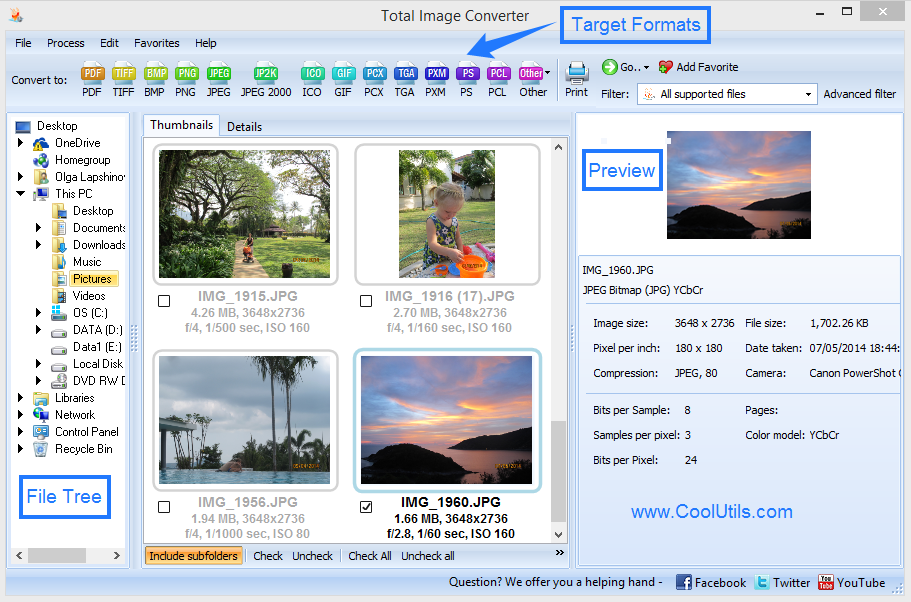
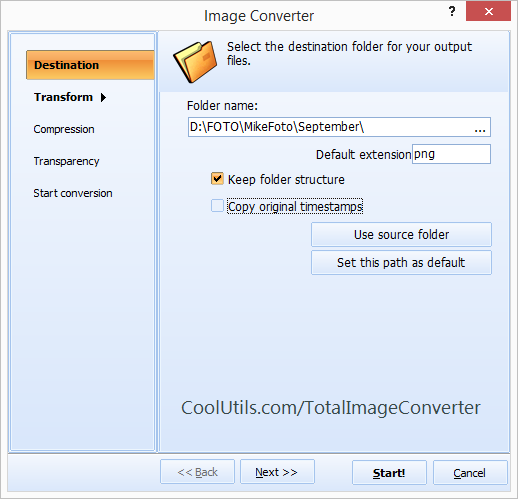
Quick answer: To convert EMF to PNG on Windows, install Total Image Converter, browse to the folder of EMF files, click Check All to select them, click the PNG button, set the output DPI (96 for screen, 300 for print) and any resize size, then click Start. Each metafile is rasterized to PNG for the whole folder in one batch — offline, with no upload and no file-size limit.
EMF stands for Enhanced Metafile Format. It is a Windows GDI (Graphics Device Interface) vector format developed by Microsoft to store graphics as a sequence of rendering commands rather than a pixel grid. When an application draws an EMF, Windows replays those commands at any size without quality loss — EMF is inherently resolution-independent.
EMF files appear most often in two places: the Windows clipboard (when you copy a chart or drawing from Office, it is stored as EMF internally) and in Office document exports, Visio diagrams, and legacy Windows printing workflows. Many reporting tools write EMF when generating graphics for print-quality output.
The critical limitation of EMF is that it is entirely Windows-specific. The format relies on Windows GDI APIs that do not exist on macOS, Linux, iOS, Android, or any browser. Outside Windows, an EMF file is unreadable. Even on Windows, browser-based applications and web publishing tools cannot display EMF. This makes EMF unsuitable for any workflow that crosses platform boundaries or involves the web.
Understanding the differences between EMF and common image formats helps clarify when and why conversion is necessary.
| Property | EMF | PNG | SVG | TIFF |
|---|---|---|---|---|
| Type | Vector metafile | Raster bitmap | Vector (XML) | Raster bitmap |
| Scalable | Yes (GDI commands) | No | Yes | No |
| Cross-platform | No (Windows only) | Yes (universal) | Yes (browsers, SVG editors) | Partial (requires TIFF viewer) |
| Transparency (alpha) | Limited (EMF+) | Yes (full alpha) | Yes | Yes (with extra channels) |
| Web browser support | None | Full (all browsers) | Full (all modern browsers) | None (no native support) |
| Best for | Windows print/clipboard | Web, sharing, documentation | Web vector graphics | Print, archiving |
PNG is the correct choice for web publishing, documentation, and cross-platform sharing because it combines lossless compression, full alpha transparency, and universal viewer support. The tradeoff is that PNG is rasterized at a fixed resolution: choose your DPI carefully at conversion time.
Total Image Converter includes a full command-line interface. Convert a single EMF file from a script or batch job:
ImgConverter.exe C:\Graphics\diagram.emf C:\Output\ -c PNG -dpi 300Convert all EMF files in a folder recursively and resize output to 1920 pixels wide:
ImgConverter.exe C:\Graphics\*.emf C:\Output\ -c PNG -dpi 96 -W 1920Wrap either command in a .bat file and schedule it with Windows Task Scheduler for unattended batch conversion. A separate server license is available for integration into automated pipelines without a GUI.

Select a folder with hundreds of EMF files and convert them all to PNG in one run. There is no queue, no upload, and no per-file cap. Every EMF in the folder — including EMF+ variants — is processed in a single pass. The output files land in the destination folder named to match their source files, so your folder structure stays organized.
When you convert a vector EMF to raster PNG, the output resolution determines quality. Total Image Converter lets you set any DPI value from 72 to 1200. For a diagram going on a webpage, 96 DPI produces a compact, sharp PNG. For a technical illustration destined for print or a high-resolution display, 300 or 600 DPI gives you the pixel density you need. Online tools offer no such control — they convert at a fixed resolution that is rarely what you actually want.
Beyond DPI, you can resize the output PNG to a specific pixel width, height, or percentage of the original. This is useful when EMF graphics from different sources have inconsistent sizes and you need a uniform output. Set a maximum bounding box — for example, 800×600 pixels — and the converter scales each image to fit within that area while preserving the aspect ratio.
Total Image Converter runs entirely on your Windows PC. No files are sent to any server. This matters for graphics that contain sensitive content: product diagrams, internal documentation screenshots, or medical imaging exports. The conversion process never touches the internet.
A personal license starts at $24.90 — a one-time payment with no subscription. Compare that to SaaS converters that charge monthly fees for batch access. Total Image Converter supports 60+ input formats, so the same license handles BMP, TIFF, WMF, JPEG, GIF, WebP, RAW, and dozens more besides EMF.
| Feature | Online Converters | Total Image Converter |
|---|---|---|
| File size limit | 5–25 MB typical | No limit |
| Batch conversion | One file at a time | Entire folders, unlimited files |
| Privacy | Files uploaded to cloud servers | 100% offline, nothing uploaded |
| DPI / resolution control | Not available (fixed resolution) | 72–1200 DPI, user-defined |
| Resize output | Rarely available | Pixel dimensions or percentage |
| Automation / scripting | Manual only, browser required | Full command-line interface |
| Pricing | Subscription or per-file credits | One-time $24.90 |

Here are the five most common situations that require converting EMF files to PNG:
(includes 30 day FREE trial)
(only $24.90)
ImgConverter.exe C:\Input\*.emf C:\Output\ -c PNG -dpi 300. A separate server license is available for unattended use without a GUI.
Download free trial and convert your files in minutes.
No credit card or email required.

Related Topics
Convert ICNS to JPEG with ease and smile