Need help? Reach us at 

 +1 (855) 418-2323
Need help? Reach us at
+1 (855) 418-2323

 File Converters TIFF and PDF apps Forensic Freeware
If you've used Thunderbird as your primary email client for any length of time, you'll know it soon starts creaking at the seams and needs to be actively managed in terms of archiving content.
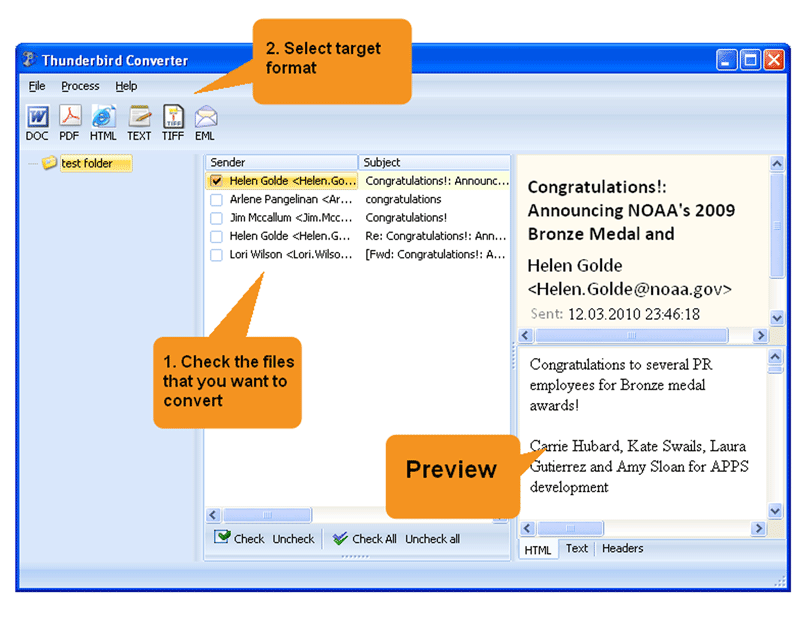
Quick answer: To convert Thunderbird emails to DOC, install Total Thunderbird Converter, select the emails or folders you want, click the DOC button, choose whether each email becomes a separate DOC or several are merged into one file, then run the conversion. It processes one email or hundreds in batch, keeps the original formatting, and offers a free trial.
When it comes to getting data out, you could of course painstakingly copy and paste the relevant data into a Word file but that's hardly the simplest solution. A far easier solution is to convert Thunderbird emails to DOC automatically using our Total Thunderbird Converter software.
It's far from the only output format on offer but DOC makes a very handy solution if you need to edit the contents of the file or share with others for review.
If you decide to take this path and store old electronic correspondence in DOC files, you'll have the advantage of saving the original formatting while being able to open them on practically any computer.
Total Thunderbird Converter is specifically designed to deal with emails in bulk so whether you're processing one file or hundreds, it will be able to handle the task with ease.
This fully featured email converter offers a few different ways of exporting emails from Thunderbird to DOC format. You are free to:
Total Thunderbird Converter also runs on the command line so power users are free to take advantage of all its functionality with just a few keystrokes if that suits their workflow better. Simply select your option flags and you can convert all emails with one command that will take mere seconds.

The software can also be set to delete original files from your inbox post-conversion. Just another small but powerful touch that can save you valuable time.
Download the free trial version of Total Thunderbird Converter today and start discovering how much wasted time and effort it could save you and your team.
Download free trial and convert your files in minutes.
No credit card or email required.

Related Topics
Total Thunderbird Converter