Need help? Reach us at 

 +1 (855) 418-2323
Need help? Reach us at
+1 (855) 418-2323

 File Converters TIFF and PDF apps Forensic Freeware
APIs, web services, and modern applications expect data in JSON. If your data is stored as XML — exported from databases, ERP systems, or legacy integrations — you need a reliable way to convert it. Total XML Converter reads XML files and transforms them into well-formed JSON, preserving the hierarchy of elements and attributes. It handles hundreds of files in a single batch run, entirely offline.
Download Total XML Converter and start converting XML to JSON today.
(includes 30 day FREE trial)
(only $59.90)
Quick answer: To convert XML to JSON, install Total XML Converter, navigate to the folder with your XML files, check the ones you want, click the JSON button in the format toolbar, set the output folder and encoding (UTF-8), then press Start. Elements and attributes map to JSON objects and arrays in one batch run, offline, with no upload and no file-size limit.
XML (eXtensible Markup Language) uses tags, attributes, and a tree structure to describe data. It supports schemas (XSD), namespaces, and comments. XML is widely used in enterprise integrations, SOAP web services, and configuration files. However, XML is verbose — tags add significant overhead, and parsing XML requires heavier libraries than JSON.
JSON (JavaScript Object Notation) represents data as key-value pairs, arrays, and nested objects. It is the default data format for REST APIs, NoSQL databases (MongoDB, CouchDB), and JavaScript-based applications. JSON is compact, human-readable, and parsed natively by every modern programming language.
When you convert XML to JSON, each XML element becomes a JSON object key. Attributes are mapped to keys (often prefixed with @). Repeated child elements become JSON arrays. The result is a lighter, API-ready representation of the same data.
| Feature | XML | JSON |
|---|---|---|
| Syntax | Tags and attributes | Key-value pairs and arrays |
| Verbosity | High (opening + closing tags) | Low (compact notation) |
| Data types | Everything is text | String, number, boolean, null, array, object |
| Schema support | XSD, DTD, RelaxNG | JSON Schema (optional) |
| Comments | Supported | Not supported |
| Primary use | Enterprise, SOAP, config files | REST APIs, web apps, NoSQL |
| Parsing speed | Slower (DOM/SAX) | Faster (native in JS, Python, etc.) |
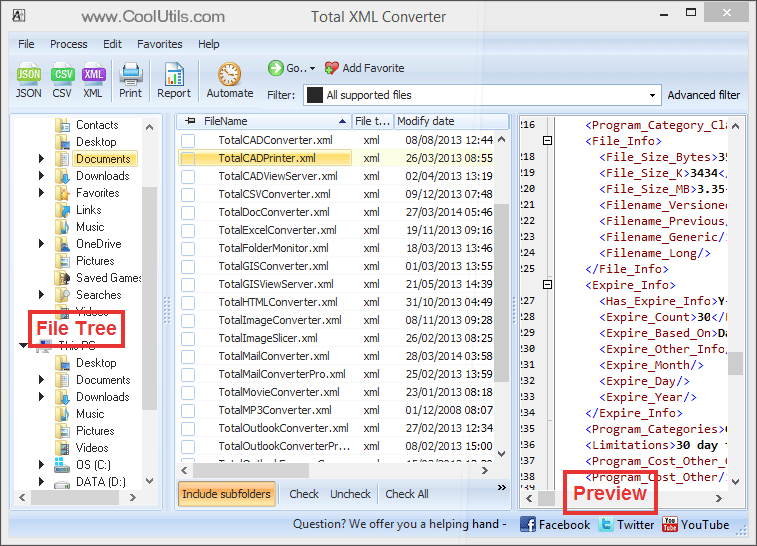
Each XML file produces a separate JSON file. Nested XML elements are mapped to nested JSON objects. Original XML files remain untouched.
Total XML Converter includes a command-line interface for scripting and automation:
XMLConverter.exe C:\Data\*.xml C:\Output\ -c JSON
This converts all XML files in the Data folder to JSON and saves them in the Output directory. Wrap the command in a .bat file or schedule it with Windows Task Scheduler for automated nightly conversions — ideal for ETL pipelines that feed JSON into APIs or NoSQL databases.
 Accurate structure mapping. Total XML Converter preserves the full hierarchy of XML elements in JSON output. Parent-child relationships, attributes, and repeated elements are mapped correctly without manual configuration.
Batch processing. Select hundreds of XML files and convert them all to JSON in a single run. Each file becomes a separate JSON document. No need to process files one at a time.
Handles complex XML. Namespaces, CDATA sections, mixed content, deeply nested elements — the converter handles them all. Even large XML feeds with thousands of nodes are processed quickly.
UTF-8 output. JSON files are saved in UTF-8 encoding by default — the standard for web APIs and modern applications. International characters are preserved correctly.
Offline and private. All conversion happens locally on your machine. XML data is never uploaded to any server. This matters when you work with sensitive business data, financial records, or personal information.
20+ output formats. Besides JSON, convert XML to CSV, XLSX, PDF, DOC, HTML, TXT, and more — all from the same program.
| Feature | Online Tools | Total XML Converter |
|---|---|---|
| File size limit | 5–50 MB typical | No limit |
| Batch conversion | One file at a time | Unlimited |
| Privacy | Files uploaded to cloud | 100% offline |
| Structure preservation | Basic mapping | Full hierarchy with attributes |
| Namespaces | Often stripped or broken | Handled correctly |
| Automation | Manual only | Built-in command line |
| Pricing | Subscription or per-file | One-time $59.90 |

(includes 30 day FREE trial)
(only $59.90)
Download free trial and convert your files in minutes.
No credit card or email required.



Related Topics
Total XML Converter