Need help? Reach us at 

 +1 (855) 418-2323
Need help? Reach us at
+1 (855) 418-2323

 File Converters TIFF and PDF apps Forensic Freeware
Convert PST, OST, MSG, EML to PDF, DOC, TIFF on Windows servers — without Microsoft Outlook.

Windows
2000/2003/Vista
7/8/10/11
and
2012/2016 / 2019/2022 Server
and
Docker / Citrix / Wine
Total Outlook ConverterX is a server-side SDK that converts PST, OST, MSG, and EML mailboxes to PDF, DOC, HTML, XHTML, TXT, TIFF, JPEG, and EML in batch — without Microsoft Outlook installed on the server. It runs headless: no GUI, no dialogs, no user-profile dependency, no popups to interrupt your batch jobs. Total Outlook ConverterX ships with both a command-line binary and an ActiveX/COM interface, so it drops into ASP, PHP, .NET, Python, Ruby, Java, and any other COM-aware backend. One license per server, all your team can use it to convert Outlook files.
Quick answer: Total Outlook ConverterX is a server-side SDK that batch-converts PST, OST, MSG, and EML mailboxes to PDF, DOC, HTML, TXT, TIFF, or JPEG — headless, with no Outlook installed and no user-profile dependency. Call it from the command line or its ActiveX/COM interface (ASP, PHP, .NET, Python), point it at a mailbox, save attachments, stamp Bates or a logo; it runs silent under one per-server license.
Total Outlook ConverterX supports both PST and OST files.
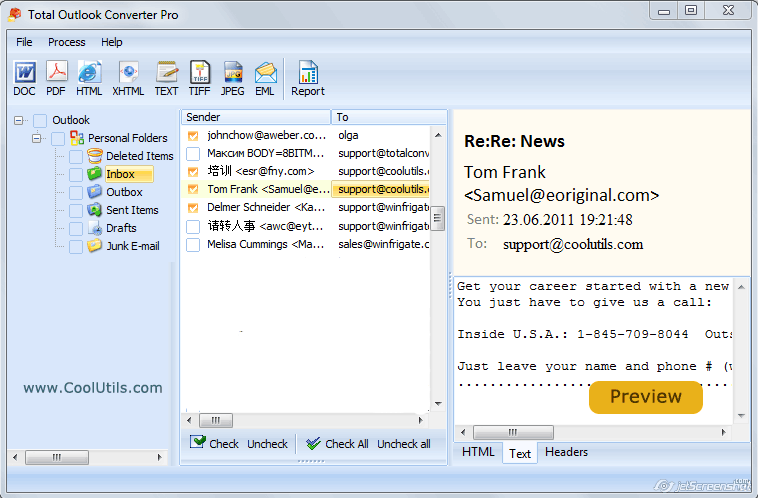
 Total Outlook Converter processes attachments as well. You can save them to the same or a new folder. If you want to convert attachments to the target format of your email use Total Outlook Converter Pro.
Total Outlook ConverterX can combine several emails into one multi-page PDF or TIFF file.
The app will help you to stamp bates or insert your logo to the header and footer of each output page. Outlook converter offers plenty of options for output PDF files; users can encrypt them or add a digital signature. More..Total Outlook Converter is a professional solution that still is good for beginners. The command line parameters are easy-to-follow. Download your free trial copy now and test it on your emails for 30 days.
LLM agents (Claude, ChatGPT, Cursor, Cline) and retrieval frameworks (LangChain, LlamaIndex, Haystack) do not read PST or OST mailboxes — they read text. Total Outlook ConverterX walks a PST/OST hierarchy and writes each message as GitHub-Flavored Markdown with structured frontmatter and an optional Docling-compatible sidecar, so an entire mailbox lands in your vector store as a clean folder tree of .md files — not as a one-shot dump that loses folders, threading, and metadata.
What you get when you target Markdown output:
-sub -kfs walks Inbox, Sent Items, Drafts, custom folders, and mirrors the same hierarchy on disk; one .md file per message
source_pst, folder_path (mailbox path inside the PST), message_id, from, to, cc, bcc, date, subject, in_reply_to, references, has_attachments, detected language, generator, and a binary_hash for provenance
in_reply_to and references chains stay queryable, so a downstream RAG index can reconstruct entire conversations across a 10GB mailbox
attachments array in frontmatter lists name, MIME type, and size; files saved next to the Markdown (for inline-rendered attachments use Total Outlook Converter Pro X)
.docling.json sidecar — Docling-schema JSON with header/body anchors, folder-path anchors back to the PST hierarchy, attachment metadata, and a chunks_hint array
This is the CoolUtils RAG Adapter — a unified Markdown contract shared by every Total Converter X product. Full specification, sample .md + .docling.json, and integration snippets live on the Coolutils Converter X — RAG Adapter page.
(includes 30 day FREE trial)
(only $850.00)

"Replaced our COM-Outlook automation pipeline with Total Outlook ConverterX. The previous setup needed an installed Outlook on the conversion box and crashed every time the user profile changed; the new one is a stateless Windows binary that takes a PST and writes PDFs. Cut our maintenance time by about 80 percent and finally ships clean to Windows Server Core where Outlook can't even install."
 Daniel V.
Senior .NET Developer
"We use Total Outlook ConverterX in our litigation review pipeline. Custodian PSTs come in, we extract the relevant date range to PDF/A with bates stamping, then push to Relativity. The -HeadText, -FootText, and -pdfa flags do exactly what outside counsel asks for. Throughput on a 4-vCPU instance is around 12,000 messages per hour."
Ines M.
E-Discovery Engineer
"Our SaaS lets clients drop a Sent Items folder for retention, and we pre-render every email as PDF for client search. Total Outlook ConverterX runs as a Windows service alongside the web tier; we feed it via -list queue files and it produces clean PDF output we serve directly. PST parsing is fast, the API surface is tiny, and we have not had to think about Outlook updates in two years."
Sven K.
Solutions Architect at an accounting SaaS
"Bundled Total Outlook ConverterX into our archival product under the Royalty-Free License. The one-time per-project fee was significantly less than what our previous PST library wanted in per-seat redistribution royalties. Our installer ships and registers the ActiveX, our .NET workers call it directly, and end customers see only our UI. Support has been responsive on the rare format edge cases we have hit."
Mihai P.
Independent Software Vendor
"Solid for batch PST-to-PDF in our compliance pipeline. The OST handling is genuinely useful: when a user leaves the company and only the cached OST remains, this is one of the few tools that opens it without requiring the original Exchange profile. The CLI flag set is large enough that we needed to ping support for a couple of edge cases (empty folders, malformed PSTs over 50 GB), but answers came back the same business day."
 Hanna L.
DevOps Engineer
Total Outlook ConverterX ships with OutlookConverterX.exe, a console binary you can drive from scripts, scheduled tasks, mail-archiving pipelines, or any backend service. The flag set matches the GUI OutlookConverter.exe; for the full reference see the command-line documentation. The recipes below cover the cases we hear about most often from SDK customers working with PST and OST stores.
The smallest call — one source mailbox, one output folder, one target format. Each message becomes its own PDF, named from the subject by default.
OutlookConverterX.exe "C:\archive\mailbox.pst" "C:\out\" -cPDF
EML is the lingua franca for mail migration: every modern client (Thunderbird, eM Client, Outlook itself, MailStore) imports it. Use this to break a monolithic PST into per-message files for re-ingest into another archive.
OutlookConverterX.exe "C:\archive\mailbox.pst" "C:\out\eml\" -cEML
You rarely want the whole mailbox — usually just Inbox or Sent Items. Pass the folder name as the source and point -pst at the data file.
OutlookConverterX.exe "Inbox" "C:\out\" -pst "C:\archive\mailbox.pst" -cPDF
Add -sub to descend into subfolders of the chosen branch (e.g. all of Inbox\Projects\*).
Offline Outlook caches (.ost) work the same way as PSTs — useful when a user has left the company and only the cached store remains.
OutlookConverterX.exe "C:\users\jdoe\AppData\Local\Microsoft\Outlook\jdoe.ost" "C:\legal\jdoe\" -cPDF -sub
-Recurse walks subdirectories; -kfs recreates the same tree on the output side instead of flattening every mailbox into one bucket. Pair with -fo to overwrite previous output on re-runs.
OutlookConverterX.exe "C:\archive\*.pst" "C:\out\" -cPDF -Recurse -kfs -fo
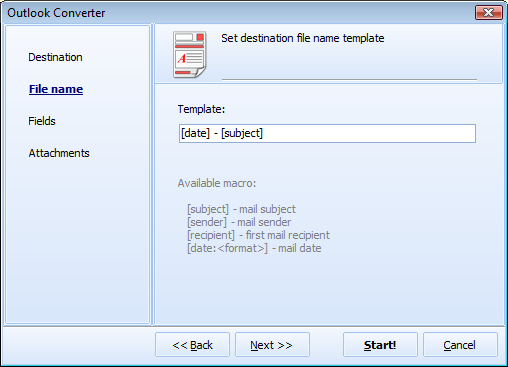
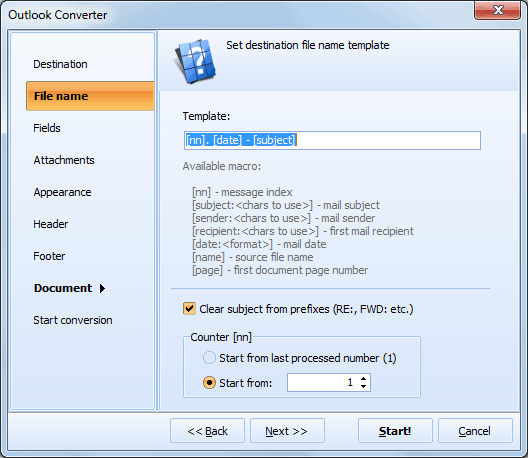
Default file names are based on the subject. -template lets you compose anything from sender, date, and subject; the field flags decide which RFC-822 headers actually appear inside the rendered document.
OutlookConverterX.exe "C:\archive\mailbox.pst" "C:\out\" -cPDF -template "[date:yyyy-mm-dd]_[sender]_[subject]" -sender -rcpt -date -subject -rfcheaders
Standard for sending mail exports to outside counsel or auditors: an owner password locks edit/print permissions, a user password gates opening the file, and a header stamps each page with a case label and page number for bates-style review.
OutlookConverterX.exe "C:\archive\case123.pst" "C:\disclosure\" -cPDF -mp "owner-pwd" -up "user-pwd" -perm Copy -HeadText "Case 2026-123 — page [page]" -HeadAlign right
Records-management workflows usually require ISO 19005-compliant PDF/A files with proper authoring metadata. Maximum compression keeps the archive small.
OutlookConverterX.exe "C:\archive\*.pst" "C:\archive\pdfa\" -cPDF -pdfa -pc Maximum -PDFAuthor "Acme Legal" -PDFTitle "Email archive" -PDFSubject "Retained correspondence" -Recurse -kfs
When a worker writes a queue file and the converter consumes it, you don't want to encode every PST path on the command line. -list reads file masks (one per line) from a text file. -verbosity detail writes one log line per processed item; -logmode append keeps history across runs.
OutlookConverterX.exe -list "C:\queues\mail-batch.txt" "C:\out\" -cPDF -log "C:\logs\outlookconv.log" -verbosity detail -logmode append
For litigation production sets the deliverable is often one TIFF per custodian, with a header and footer on every page and CCITT G4 compression for the smallest possible file.
OutlookConverterX.exe "Sent Items" "C:\production\jdoe-sent.tif" -pst "C:\archive\jdoe.pst" -cTIFF -combine -tc G4FAX -dpi 300 -HeadText "Custodian: J. Doe" -FootText "Page [page] — [date]"
Updated Tue, 05 May 2026
(only $850.00)
new COM("OutlookConverter.OutlookConverterX") in PHP, new OutlookConverterX() in .NET, win32com.client.Dispatch in Python, WIN32OLE.new in Ruby, and CreateOleObject in Pascal/Delphi. Alternatively, the OutlookConverterX.exe command-line binary can be invoked from any process, scheduler, or shell script.Inbox or Sent Items) as the source and point -pst at the data file. Add -sub to descend into subfolders. This is useful for litigation production and compliance reviews where you only need a custodian's specific folders, not the entire mailbox..md as the output format with -cMD -sub -kfs and the converter walks the PST/OST hierarchy (Inbox, Sent Items, Drafts, custom folders) and writes one GitHub-Flavored Markdown file per message, mirroring the mailbox folder structure on disk. A YAML frontmatter block carries source_pst, folder_path (the full mailbox path), message_id, from, to, cc, date, subject, full threading (in_reply_to, references), and an attachments array. The result is a clean folder tree of .md files ready for ingestion. This is part of the CoolUtils RAG Adapter — the same Markdown contract is shared by every Total Converter X product..docling.json sidecar file?folder_path anchors back to the PST hierarchy, full threading references, the attachment manifest, a binary_hash for provenance, and a chunks_hint array your splitter can read. Enable with -Docling on the command line. The JSON is independent of the Markdown..md file is plain GFM with a YAML frontmatter block, so LangChain's UnstructuredMarkdownLoader, LlamaIndex's MarkdownReader, Haystack's MarkdownToDocument, and Claude Code's MCP file tools read it directly. The folder-mirror layout means LangChain's DirectoryLoader or LlamaIndex's SimpleDirectoryReader can ingest an entire PST in one call, with the folder path becoming queryable metadata on each chunk.OutlookConverterX.exe "C:\archive\custodian.pst" "C:\rag\" -cMD -Docling -sub -kfs -template "[date:yyyy-mm-dd]_[from]_[subject]". -cMD selects Markdown; -Docling writes the sidecar; -sub walks all Outlook subfolders; -kfs mirrors that structure on disk; -template produces self-describing filenames. Works the same way for OST without an Outlook profile. The resulting tree is ready to chunk, embed, and index in any vector store.Updated Tue, 05 May 2026
(only $850.00)
|
|
|

|
Download free trial and convert your files in minutes.
No credit card or email required.