Logo
Home Products Support Contact About Us
arrow1 File Converters
arrow1 TIFF and PDF apps
arrow1 Forensic
arrow1 Freeware

Convert XLSX to HTML — Export Excel Spreadsheets to HTML Pages in Batch


Excel spreadsheets contain structured data with formatting, charts, and formulas — but they require Excel or a compatible application to view. When you need to publish spreadsheet data on a website, create browser-accessible reports, or embed tabular data in a CMS, HTML is the right output format. Total Excel Converter exports XLSX files to HTML pages in batch, preserving cell formatting, tables, and visual layout. This XLSX to HTML converter:
  • Converts XLSX spreadsheets to HTML pages with preserved cell formatting and tables
  • Processes hundreds of XLSX files in one batch run
  • Preserves fonts, colors, borders, merged cells, and number formats
  • Handles multi-sheet workbooks — each sheet becomes a separate HTML page
  • Works 100% offline — spreadsheet data never leaves your machine
  • Includes a 30-day free trial with full functionality

Download Total Excel Converter and start exporting your Excel data to HTML.


Download Now!

(includes 30 day FREE trial)

Buy License

(only $49.90)

XLSX vs HTML: What Is the Difference?

XLSX (Excel Workbook) is the default spreadsheet format since Excel 2007. It stores cell values, formulas, formatting, charts, and multiple worksheets in a ZIP-compressed XML package. XLSX files are designed for data editing and calculation — they require Excel or a compatible application to open and render correctly. The visual appearance can vary depending on installed fonts and Excel version.

HTML (HyperText Markup Language) is the standard language of the web. Every browser on every device renders HTML natively. HTML tables display structured data with formatting that is consistent across platforms. Converting XLSX to HTML produces web-ready pages that anyone can view without installing spreadsheet software.

The key difference is accessibility. XLSX is for working with data in a spreadsheet application. HTML is for displaying data in a browser to the widest possible audience. Converting XLSX to HTML makes spreadsheet content available on websites, intranets, and any system that renders web pages.

FeatureXLSXHTML
Viewer requiredExcel or compatible appAny web browser
FormulasSupportedValues only (calculated)
Web publishingNot directly possibleNative web format
Search engine indexingLimitedFull indexing
Cross-platform displayVaries by versionConsistent everywhere
File sizeLarger (XML + ZIP)Smaller (plain text + CSS)

How to Convert XLSX to HTML

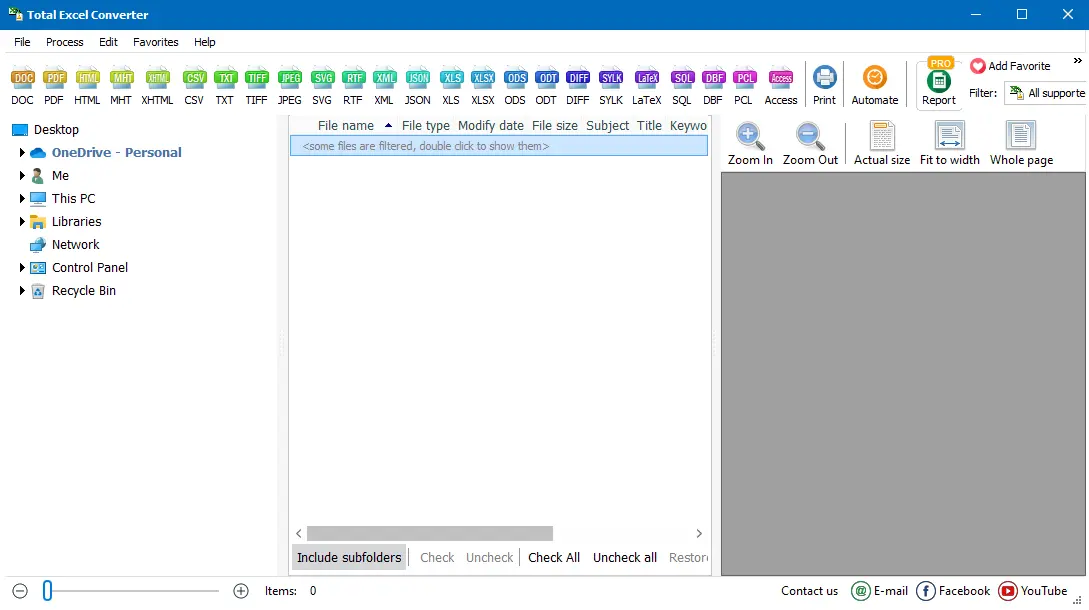
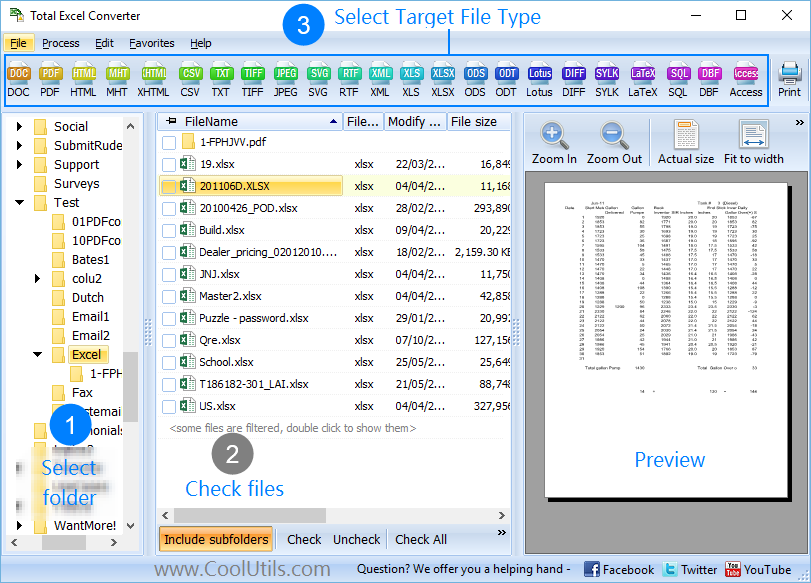
  • Step 1. Launch Total Excel Converter. The left panel shows a folder tree for quick navigation.
  • Step 2. Browse to the folder with your XLSX files. The file list displays all spreadsheets with names, sizes, and dates. Check individual files or click Check All for batch conversion.
  • Step 3. Click HTML in the format toolbar at the top of the window.
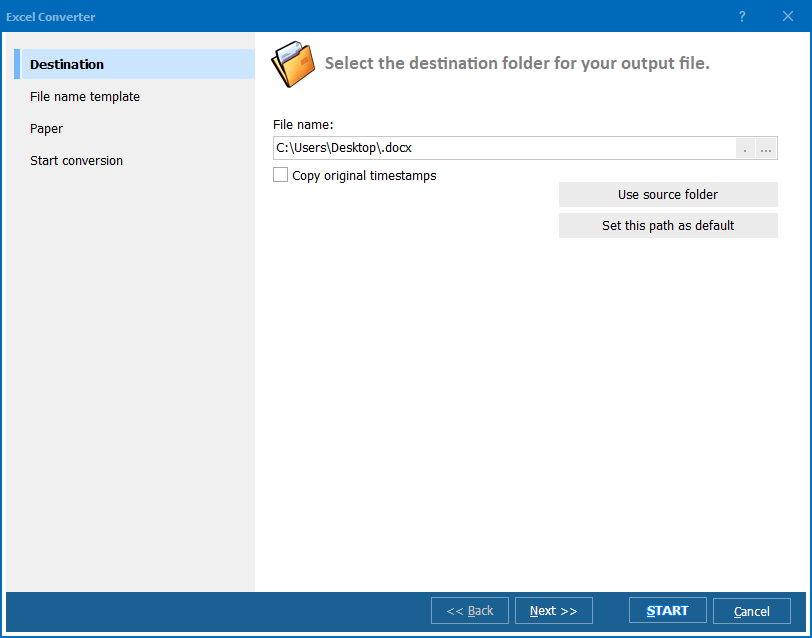
  • Step 4. In the conversion wizard, choose the destination folder and the HTML encoding (UTF-8 recommended). Decide whether to embed CSS styles inline or use an external stylesheet.
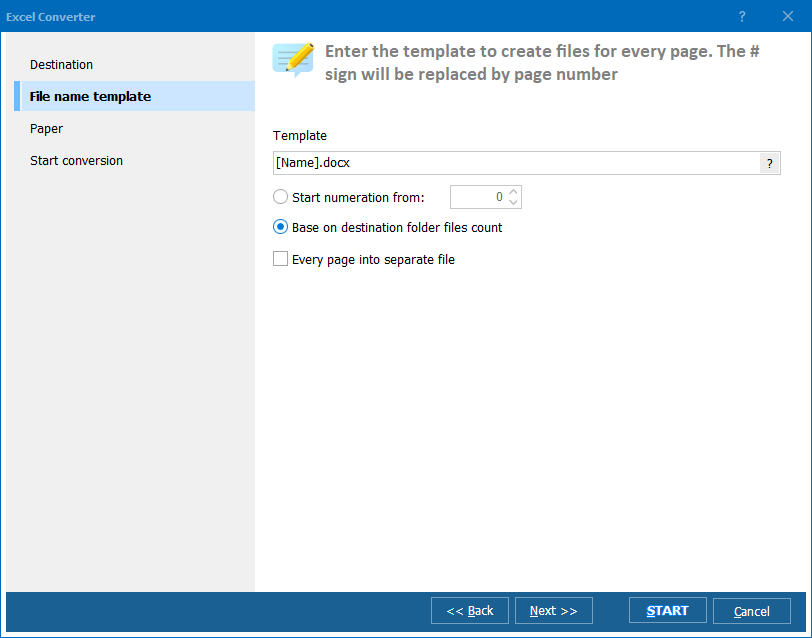
  • Step 5. Configure sheet handling: export all sheets into separate HTML pages, or select specific sheets. Set output file naming by original file name, sheet name, or a custom pattern.
  • Step 6. Press Start. Each XLSX file produces one or more HTML pages depending on the number of sheets. Original files remain untouched.

Total Excel Converter - XLSX to HTML conversion

The converted HTML pages display spreadsheet data as formatted tables, preserving the cell structure, colors, and borders exactly as they appear in the Excel print preview.

Command-Line Conversion

Total Excel Converter includes a command-line interface for scripted and automated workflows. Convert a single XLSX file to HTML:

ExcelConverter.exe C:\Data\report.xlsx C:\Output\report.html -cHTML

Convert an entire folder with UTF-8 encoding:

ExcelConverter.exe C:\Data\*.xlsx C:\Output\ -cHTML -Encoding:UTF8

Embed this in a .bat script or Windows Task Scheduler for automated XLSX-to-HTML exports — useful for web report publishing, dashboard updates, and intranet content pipelines.

Why Use Total Excel Converter?

Accurate table rendering

XLSX cell formatting translates directly to HTML tables with CSS styling. Fonts, colors, borders, merged cells, number formats, and column widths are preserved. The HTML output matches the spreadsheet layout as closely as possible.

Batch processing

Select an entire folder of XLSX files and convert them all to HTML in one run. The program handles hundreds of spreadsheets without slowing down, producing one HTML page per sheet.

Multi-sheet handling

XLSX workbooks often contain multiple sheets. The converter exports each sheet as a separate HTML page with a clear naming convention, or you can select specific sheets to export.

Web-ready output

The generated HTML uses standard table markup and CSS. Upload the files directly to any web server, import them into a CMS, or open them in a browser. No additional processing needed.

20+ output formats

Besides HTML, Total Excel Converter handles XLSX to PDF, CSV, DOC, TXT, TIFF, JPEG, XML, ODS, SQL, LaTeX, and more — all from the same tool.

No cloud uploads

All conversion runs locally on your PC. Financial reports, salary tables, internal data — nothing is uploaded to external servers. No internet connection required.

Online Converters vs Desktop Converter

FeatureOnline ToolsTotal Excel Converter
File size limit10–50 MBNo limit
Batch conversionOne file at a timeUnlimited
PrivacyFiles uploaded to cloud100% offline
Table formattingBasic or brokenFull CSS-styled tables
Multi-sheet handlingFirst sheet onlyAll sheets or selected
AutomationManual onlyBuilt-in command line
PricingSubscription or adsOne-time $49.90

download XLSX to HTML converter

Windows 7/8/10/11 • 30-day free trial

When Do You Need XLSX to HTML Conversion?

There are several common scenarios where exporting Excel spreadsheets to HTML is the right solution:
  1. Web report publishing. Publishing financial reports, dashboards, or data tables on a company website or intranet. HTML tables display in any browser without requiring Excel installation.
  2. CMS content import. Importing spreadsheet data into WordPress, SharePoint, Drupal, or other content management systems. These platforms accept HTML natively, while XLSX requires special plugins.
  3. Email-friendly tables. Embedding formatted data tables in HTML emails. Email clients render HTML tables reliably, while XLSX attachments require the recipient to have Excel.
  4. Cross-platform sharing. Sharing spreadsheet data with users on macOS, Linux, or mobile devices who may not have Excel. HTML opens everywhere with no software requirements.
  5. Data archiving. Creating browser-accessible archives of spreadsheet data that remain readable regardless of future Excel version changes. HTML is an open standard with guaranteed long-term support.


Download Now!

(includes 30 day FREE trial)

Buy License

(only $49.90)


quote

Total Excel Converter Customer Reviews 2026

Rate It
Rated 4.7/5 based on customer reviews
5 Star

"We publish monthly financial summaries on our company intranet. Converting the XLSX reports to HTML with this tool saves hours of manual formatting. Tables come out clean with proper borders and cell colors. The batch mode handles all 40 department reports in one pass."

5 Star Rachel Kim Web Developer

"I use the command-line version to automate daily XLSX-to-HTML exports for our internal dashboard. The HTML tables render consistently across Chrome, Firefox, and Edge. Merged cells and number formats survive the conversion. Runs unattended in a scheduled task."

5 Star Martin Schreiber Data Analyst

"Handy tool for converting product price lists from Excel to HTML for our website. Multi-sheet workbooks split neatly into separate pages. The only improvement I would suggest is an option to add custom CSS classes to the output tables. Otherwise the conversion quality is excellent."

4 Star Alicia Torres Marketing Coordinator

FAQ ▼

Yes. Cell formatting including fonts, colors, borders, merged cells, and number formats translates to HTML tables with CSS styling. The output closely matches the spreadsheet appearance.
Each sheet is exported as a separate HTML page. The output file name includes the original file name plus the sheet name. You can also select specific sheets to export and skip the rest.
UTF-8 is recommended for most scenarios. It supports all international characters and is the default encoding for modern web pages. Use ANSI only if your target system specifically requires it.
Total Excel Converter handles both XLSX and XLS, as well as ODS, XLSM, CSV, and other spreadsheet formats. Select any combination of file types and convert them all to HTML in one batch.
HTML cannot store formulas. The converter evaluates all formulas and writes the calculated values to the HTML tables. The output displays the same numbers and text you see in Excel.
Yes. The built-in command-line interface supports every option available in the GUI. Run ExcelConverter.exe with source files, destination, and format flag for automated workflows.
A personal license costs $49.90 as a one-time payment with free updates for one year. A 30-day free trial is available with no credit card or email required.


Start working now!

Download free trial and convert your files in minutes.
No credit card or email required.

⬇ Download Free Trial Windows 7/8/10/11 • 36 MB

Friday Sale
Excel Converter Preview1
Excel Converter Preview2
Excel Converter Preview3

Latest News

Newsletter Subscribe

No worries, we don't spam.


© 2026. All rights reserved. CoolUtils File Converters

Cards