Need help? Reach us at 

 +1 (855) 418-2323
Need help? Reach us at
+1 (855) 418-2323

 File Converters TIFF and PDF apps Forensic Freeware
You need the raw text out of a PDF — for indexing, data analysis, database import, or content migration. Adobe Reader lets you copy-paste a few paragraphs, but it fails on multi-page documents, multi-column layouts, and tables. Online converters process one file at a time and upload your data to someone else's server. Total PDF Converter extracts text from hundreds of PDFs in one batch, runs entirely on your Windows machine, and gives you a choice of encoding: ANSI, UTF-8, or Unicode.
Quick answer: To convert PDF to text, launch Total PDF Converter, tick the PDF files you need, click the TXT button, pick the encoding (ANSI, UTF-8, or Unicode) and output folder in the wizard, then press Start. It extracts text from hundreds of PDFs in one batch, reads multi-column layouts correctly, and runs offline with no file-size limit.
PDF is a fixed-layout format. It embeds fonts, images, and vector graphics so the document looks identical everywhere. That stability comes at a cost: extracting just the text requires a converter that understands the internal PDF structure — glyph positions, encoding tables, embedded fonts, and page streams.
A plain-text file contains characters and line breaks — nothing else. It opens in any editor on any operating system. TXT is the input format for search indexes (Elasticsearch, Solr), databases, data-processing scripts, NLP pipelines, and content management systems. When you strip a PDF down to text, you get data you can query, transform, and reuse.
Launch Total PDF Converter. The folder tree on the left shows your drives and directories. Navigate to the folder with your PDFs and tick the files you need. To select an entire folder, tick the folder checkbox.
Click the TXT button in the format bar. The settings wizard opens with tabs for encoding, page range, and destination.
Choose ANSI, UTF-8, or Unicode depending on your needs. Specify the output folder. If you want all extracted texts merged into one file, enable Combine files. To extract only certain pages, set the page range.
Press Start. The converter reads each PDF, extracts the text layer, and writes plain TXT files with the chosen encoding. A progress log shows the status for every file.
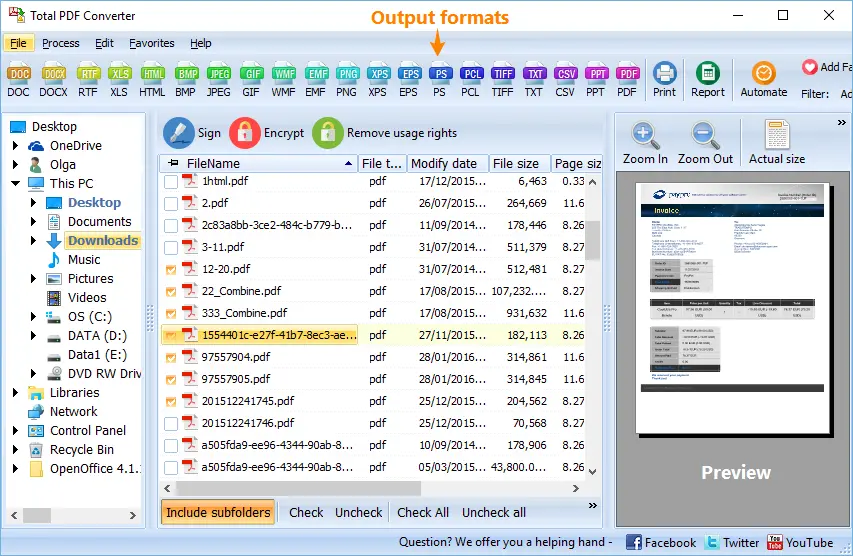

Total PDF Converter includes a command-line interface for scripting and automation:
PDFConverter.exe "C:\Reports\*.pdf" "C:\Output\" -cTXT -oUTF8
Parameters: source path (wildcards supported), destination folder, -cTXT sets the target format, -oUTF8 sets encoding. Save this in a .bat file and schedule it with Windows Task Scheduler. Total PDF Converter X (server edition) runs without a GUI and adds ActiveX support for integration into web applications and automated document pipelines.
| Feature | Online Converter | Total PDF Converter |
|---|---|---|
| Batch conversion (100+ files) | No — one file at a time | Yes — unlimited files and folders |
| Encoding choice | Usually UTF-8 only | ANSI, UTF-8, or Unicode with BOM |
| Page range selection | Rarely | Yes — any page range |
| Combine output into one file | No | Yes |
| Command line / automation | No | Yes — CLI + .bat scripting |
| File size limit | Typically 10–50 MB | No limit |
| Privacy | Files uploaded to a third-party server | 100% offline — files stay on your PC |
| Multi-column layout handling | Often garbled | Reads column order correctly |
The converter reads the internal PDF text layer — glyph positions, encoding maps, embedded fonts. Multi-column documents, tables, and mixed-language text are handled correctly. The output follows natural reading order, not the raw PDF object sequence.
PDF 1.0 through PDF 2.0, encrypted files (with the password supplied), linearized PDFs, and files with embedded fonts — Total PDF Converter handles them all.
One tool converts PDF to 15+ formats: DOC, DOCX, RTF, XLS, XLSX, CSV, HTML, XHTML, TIFF, JPEG, PNG, BMP, EPS, PS, PDF/A, and Unicode text. Buy one license and cover every conversion task.
Total PDF Converter X runs as a background process with no GUI. It accepts commands via ActiveX or command line and processes PDFs around the clock. Ideal for document ingestion, helpdesk systems, and automated archival workflows.
Download the free 30-day trial — no email or credit card required. A personal license costs $39.90 and includes one year of free upgrades. Works on Windows 7/8/10/11.
Download Free Trial Buy License — $39.90
Download free trial and convert your files in minutes.
No credit card or email required.



Related Topics
