Need help? Reach us at 

 +1 (855) 418-2323
Need help? Reach us at
+1 (855) 418-2323

 File Converters TIFF and PDF apps Forensic Freeware
You need to archive emails as images that cannot be edited, searched, or accidentally modified. TIFF (Tagged Image File Format) is the standard choice for document imaging, scanning archives, and legal evidence preservation. Total Mail Converter reads EML and MSG email files, renders each message as a multi-page TIFF image — header, body, and attachments on separate pages — and processes hundreds of emails in a single batch.
Quick answer: To convert email to TIFF, install Total Mail Converter, open the folder of EML or MSG files, tick the messages or click Check All, click the TIFF button, set compression, DPI, page size, and attachment handling, then click Start. Each email is saved as a multi-page TIFF image in one offline batch — no email client required and no upload.
EML and MSG are the standard formats for individual email messages. EML (RFC 5322) is used by Thunderbird, Windows Mail, and most email clients. MSG is Microsoft Outlook's proprietary format. Both contain text, HTML body, headers, and attachments — but they require an email client or specialized viewer to read.
TIFF is a raster image format widely used for document scanning and archival. A multi-page TIFF file stores each page as a separate frame, similar to a multi-page PDF but as an image. TIFF files are read by every image viewer, document management system, and scanning workflow. They cannot be edited or altered without visible traces, making them suitable for legal and compliance use.
| Feature | EML / MSG | TIFF |
|---|---|---|
| Content type | Structured email (headers, body, attachments) | Raster image (pixel-based pages) |
| Editable | Yes (text can be copied, forwarded, modified) | No (image-based, tamper-evident) |
| Viewer required | Email client (Outlook, Thunderbird, etc.) | Any image viewer, web browser, DMS |
| Multi-page support | Single message per file | Multiple pages per file (IFD chain) |
| Compression | MIME encoding | CCITT Group 4, LZW, ZIP, JPEG |
| Use case | Active email communication | Archival, legal evidence, document imaging |
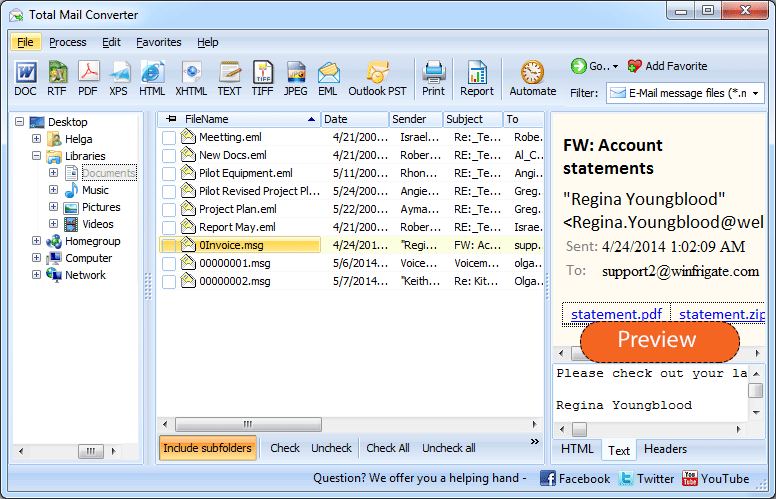
Launch Total Mail Converter. The folder tree on the left shows directories containing EML and MSG files. Navigate to the folder with your emails. The file list displays every message with sender, subject, date, and size.
Tick individual emails or click Check All to select the entire folder. Total Mail Converter supports batch processing — convert one email or ten thousand in the same operation.
Click the TIFF button on the toolbar. The settings wizard opens with TIFF-specific options.
Set the output folder and file naming pattern. Configure:
Click Start. Each email is rendered as a multi-page TIFF: the first page contains the email header (From, To, Subject, Date), followed by the message body, and then attachment pages if enabled. The log shows every converted file.

Total Mail Converter includes a command-line interface for automated workflows:
MailConverter.exe "C:\Emails\*.eml" -oTIFF -d "C:\Archive\tiff\" -dpi 300 -comp CCITT4
Parameters: source files (wildcards supported), -oTIFF sets the output format, -d specifies the destination, -dpi sets resolution, -comp selects compression. Schedule with Task Scheduler for nightly email archiving.
Additional flags: -att embed includes attachments as extra TIFF pages, -color bw forces black-and-white output, -pages A4 sets page size.
| Compression | Color Support | File Size | Best For |
|---|---|---|---|
| CCITT Group 4 | Black-and-white only (1-bit) | Smallest | Text-only emails, fax-compatible output, maximum compression |
| LZW | Full color and grayscale | Medium | Emails with colored logos, images, or HTML formatting |
| ZIP (Deflate) | Full color and grayscale | Medium | General-purpose lossless compression |
| JPEG | Full color | Small | Photo-heavy emails where some quality loss is acceptable |
| None (uncompressed) | Any | Largest | Maximum quality, no compression artifacts |
| Feature | Online Email-to-TIFF Services | Total Mail Converter |
|---|---|---|
| Privacy | You upload confidential emails to a third-party server. | Runs locally. No data leaves your computer. |
| Batch mode | One file at a time, manual upload each. | Entire folders in one batch, thousands of emails. |
| TIFF settings | No control over compression, DPI, or color depth. | Full control: compression, DPI, page size, color depth. |
| Attachment handling | Usually stripped or ignored. | Embed as pages, save separately, or skip. |
| Automation | Not available. | Command-line interface with scheduling. |
| Cost | Free for small files, paid subscriptions. | One-time purchase: $59.90. Free 30-day trial. |
Total Mail Converter processes EML files (Thunderbird, Windows Mail, Apple Mail) and MSG files (Microsoft Outlook). No email client installation required — the converter reads files directly from disk.
Each email becomes a single multi-page TIFF file. Page 1: email header. Page 2+: message body. Additional pages: attached documents. One file per email, easy to index and archive.
Choose compression (CCITT, LZW, ZIP, JPEG), resolution (150–600 DPI), color depth (1-bit, grayscale, color), and page size. Match the exact requirements of your DMS, fax system, or archival standard.
Select an entire folder of emails and convert them all in one operation. No file-by-file uploads, no internet dependency. Thousands of emails convert in minutes.
Schedule nightly email-to-TIFF conversions with a .bat script. Integrate into compliance workflows, backup systems, or document management pipelines.
TIFF is one of many options. Total Mail Converter also exports to PDF, DOC, HTML, TXT, RTF, JPEG, XPS, and more. One tool for all email conversion tasks.
Download the free 30-day trial — no email or credit card required. A personal license costs $59.90 and includes one year of free upgrades. Works on Windows 7/8/10/11.
Download Free Trial Buy License — $59.90
Download free trial and convert your files in minutes.
No credit card or email required.



Related Topics
How to convert Email to PST format?