Need help? Reach us at 

 +1 (855) 418-2323
Need help? Reach us at
+1 (855) 418-2323

 File Converters TIFF and PDF apps Forensic Freeware
Batch convert MSG to PDF with Total Mail Converter for Windows, without installing Outlook. Select the messages in a folder, choose PDF, and save the output to your preferred location. You can create a separate PDF for each email or combine selected messages into one file. Download the free 30-day trial to follow the steps below.
Quick answer: To convert MSG to PDF, install Total Mail Converter, open the folder of MSG files, tick the messages or click Check All, click the PDF button, set the PDF type plus any Bates stamps or signatures, then click Start. The whole folder converts in one batch — offline, with no Outlook required and no upload.
MSG is the native format of Microsoft Outlook. Each MSG file contains a single email message: sender, recipients, subject, date, body (plain text or HTML), embedded images, and file attachments. MSG uses Microsoft's Compound File Binary Format (CFBF). Opening an MSG file requires Outlook, or a third-party MSG viewer — it cannot be read in a standard text editor or web browser.
PDF (Portable Document Format) is the universal standard for fixed-layout documents. A PDF file looks the same on every screen, every printer, and every operating system. PDFs can be read by hundreds of free viewers (Adobe Reader, Foxit, browser built-in readers). They support text search, encryption, digital signatures, and PDF/A archival compliance.
| Feature | MSG | |
|---|---|---|
| Creator | Microsoft Outlook | Adobe / ISO 32000 |
| Viewer required | Outlook or MSG viewer | Any PDF reader, web browser |
| Content | Email message + attachments | Fixed-layout document |
| Editable | Yes (in Outlook) | Read-only by default |
| Text search | Requires Outlook indexing | Built-in full-text search |
| Digital signatures | S/MIME (email-level) | PFX/X.509 (document-level) |
| Archival standard | None | PDF/A (ISO 19005) |
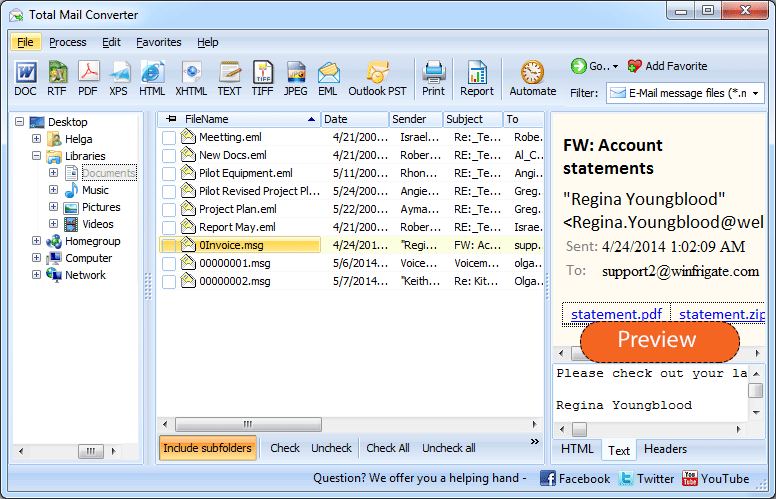
Launch Total Mail Converter. The folder tree on the left shows your local drives and network folders. Navigate to the directory containing your MSG files. The file list displays each email with its sender, subject, date, and file size.
Tick individual files or click Check All to select the entire folder. Total Mail Converter handles batch conversion — one file or ten thousand in the same run.
Click the PDF button on the toolbar. The settings wizard opens with all PDF output options.
Set the output folder and file naming pattern. Configure the following:
Click Start. Each MSG file is rendered as a PDF document: the email header (From, To, Subject, Date) appears at the top, followed by the message body with full HTML formatting, images, and links. The conversion log shows the status of every file.
For one MSG file, use the free online MSG to PDF converter.
To convert attachment content into PDF pages, see how to convert MSG to PDF with attachments using Total Mail Converter Pro.
Total Mail Converter includes a command-line interface for automated and server-side workflows:
MailConverter.exe "C:\Emails\*.msg" -oPDF -d "C:\Archive\pdf\" -bates "DOC-{N6}" -sign "C:\cert.pfx" -pwd MyPass
Parameters: source files (wildcards supported), -oPDF sets the output format, -d specifies the destination folder, -bates enables Bates stamping with a pattern, -sign attaches a digital signature. Schedule the command with Windows Task Scheduler for nightly archiving.
The GUI generates ready-to-use command lines automatically: configure settings in the wizard, and the program outputs the exact command you can paste into a .bat file.
| Option | Description | Use Case |
|---|---|---|
| Standard PDF | Searchable text with formatted layout | General-purpose email archiving and sharing |
| Non-searchable PDF | Image-based pages, text not selectable | Tamper-evident records, legal evidence |
| PDF/A | ISO 19005 archival format, self-contained | Long-term compliance archives (SEC, HIPAA) |
| Password protection | Encrypt PDF with owner/user passwords | Confidential emails, restricted distribution |
| Digital signature | PFX/X.509 certificate-based signing | Proof of authenticity, legal submissions |
| Bates stamps | Sequential numbering on every page | Litigation, e-discovery, regulatory filings |
| Merge into one PDF | Combine multiple MSG files into a single PDF | Case files, project correspondence bundles |
| Feature | Online MSG-to-PDF Services | Total Mail Converter |
|---|---|---|
| Privacy | Files are uploaded to the selected service. Review its privacy and retention policy before uploading. | Processes email files locally in a Windows desktop application. |
| Batch mode | Batch availability and file limits depend on the service. | Converts multiple MSG files from a folder in one batch. |
| Bates stamps | Check whether the service supports Bates numbering. | Customizable Bates numbering on every page. |
| Digital signatures | Check whether the service supports certificate-based signing. | PFX certificate signing during conversion. |
| PDF/A | Check whether the service supports the PDF/A version you need. | PDF/A output. |
| Attachments | Attachment handling varies by service. CoolUtils online MSG to PDF embeds attachments as files inside the PDF. | Embed attachments, save them separately, or skip them. Use Total Mail Converter Pro to convert attachment content into PDF pages. |
| Automation | Check whether the service offers an API or another automation method. | Command-line with Task Scheduler. |
| Cost | Free access, file limits, and paid options depend on the service. | One-time purchase: $59.90. Free 30-day trial. |
Total Mail Converter reads MSG files directly from disk using its own parser. It does not call Outlook, does not need MAPI, and does not require any Microsoft Office component on the machine. Install the converter on a clean Windows server and run it.
Legal professionals add Bates numbers to email evidence for court filings and e-discovery productions. Total Mail Converter stamps each page during conversion — configurable font, size, position, prefix, and numbering format. No separate PDF editing tool needed.
PDF/A (ISO 19005) is the standard for documents that must remain readable for decades. Total Mail Converter produces PDF/A output directly — all fonts are embedded, no external dependencies, compliant with archival regulations.
Convert each MSG to a separate PDF, or combine an entire folder of emails into one multi-page PDF. Both modes are available in the GUI and on the command line.
Protect output PDFs with passwords and user permissions: allow or forbid printing, editing, and text copying. Sign PDFs with a PFX certificate to guarantee document authenticity.
PDF is one option among many. Total Mail Converter also exports MSG files to DOC, DOCX, HTML, TXT, RTF, TIFF, JPEG, XPS, and more. One tool covers all email conversion needs.
Download the free 30-day trial — no email or credit card required. A personal license costs $59.90 and includes one year of free upgrades. Works on Windows 7/8/10/11.
Download Free Trial Buy License — $59.90
Download free trial and convert your files in minutes.
No credit card or email required.



Related Topics
How to Convert Email to PDF